Salutations! I’m Kevin, and I manage the user experience design team for D&D Beyond. I'm here to talk to you today about D&D Beyond's new Quickbuilder and our planned refurbishment of the Character Builder tool.
I have the pleasure of inviting you behind the proverbial DM screen to give feedback on our new Quickbuilder—as it stands today—as well as some early concepts for the future improvements to the Character Builder.
We want D&D Beyond's tools to be the best way to play D&D your way—so we need your help!
At the end of this post, we share a concept video and a feedback survey where you can help steer the direction of our development. The survey will remain open until March 31, 2026, so be sure to get your feedback in before then if you'd like to help contribute towards the future of this tool!
Update 3/31/2026: The survey is now closed. Thanks to everyone who participated!
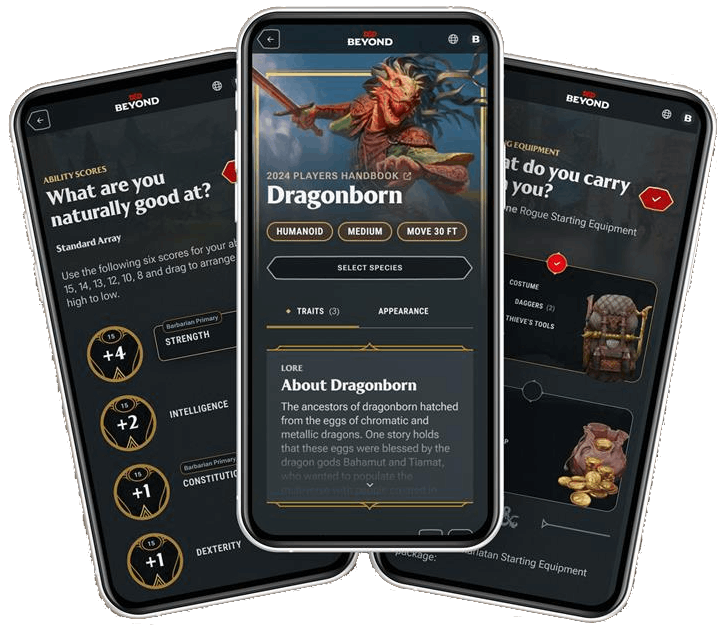
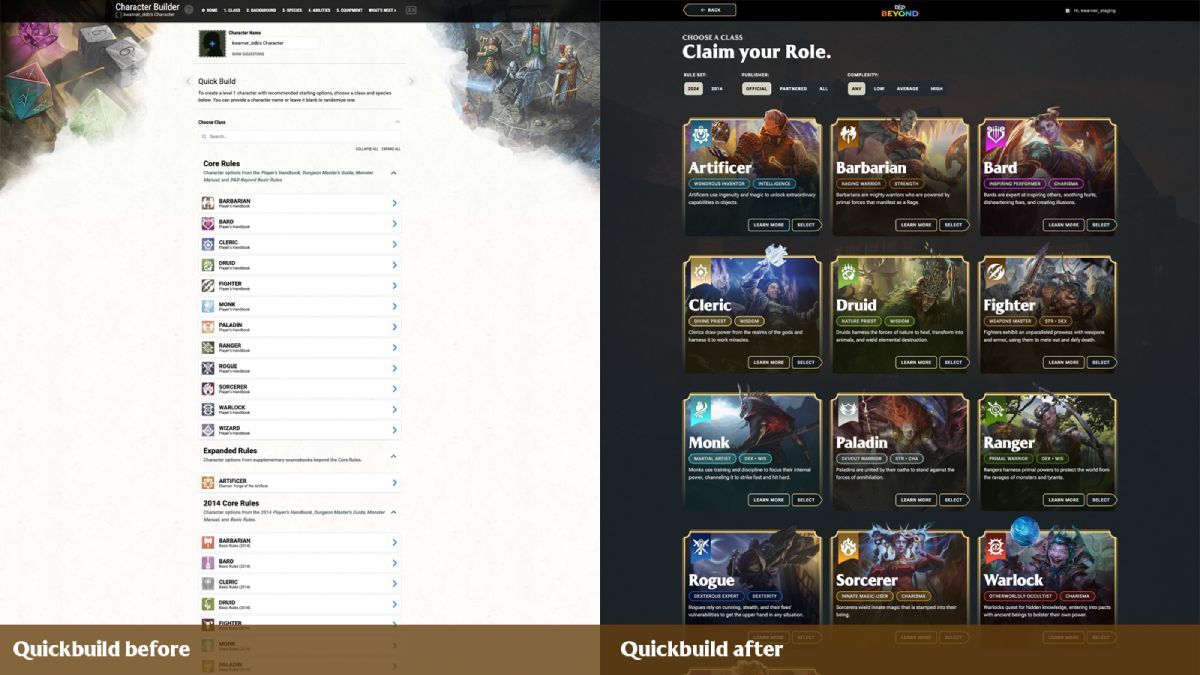
Today, we’ve launched D&D Beyond's new Quickbuilder as our first step towards our overall vision of improving the character creation experience on D&D Beyond for all players.
Eventually, we want the Character Builder to be easier to use, more fully support the game rules, suggest smart defaults, stay flexible for customization, and put more emphasis on inspiration and fun.
We’re starting with an incremental update to our Quickbuilder method of character creation, which has always been focused on letting new players easily make a level 1 character.
Compared to our standard builder, the Quickbuilder doesn’t see much use, which makes it a great place to try out new approaches, test new tech, and get feedback with little risk of disrupting your ongoing games.
Design Principles
Our design process started with talking to players about their pain points, and conducting player research labs on prototypes (For those interested in User experience research, the prototype sessions were qualitative, moderated 1:1 sessions with an average of 8 participants per round, split across two prototype rounds).
Our goal is to learn not only about the challenges with the current builder but also about players’ end-to-end D&D experience.
Here are some of the design principles we developed from those early conversations and research studies that have guided the design explorations and concepts we’re showing you today.
You shouldn’t have to be an expert in the rules to build a character.
It should feel great to use across all device sizes, from phones to 4K monitors.
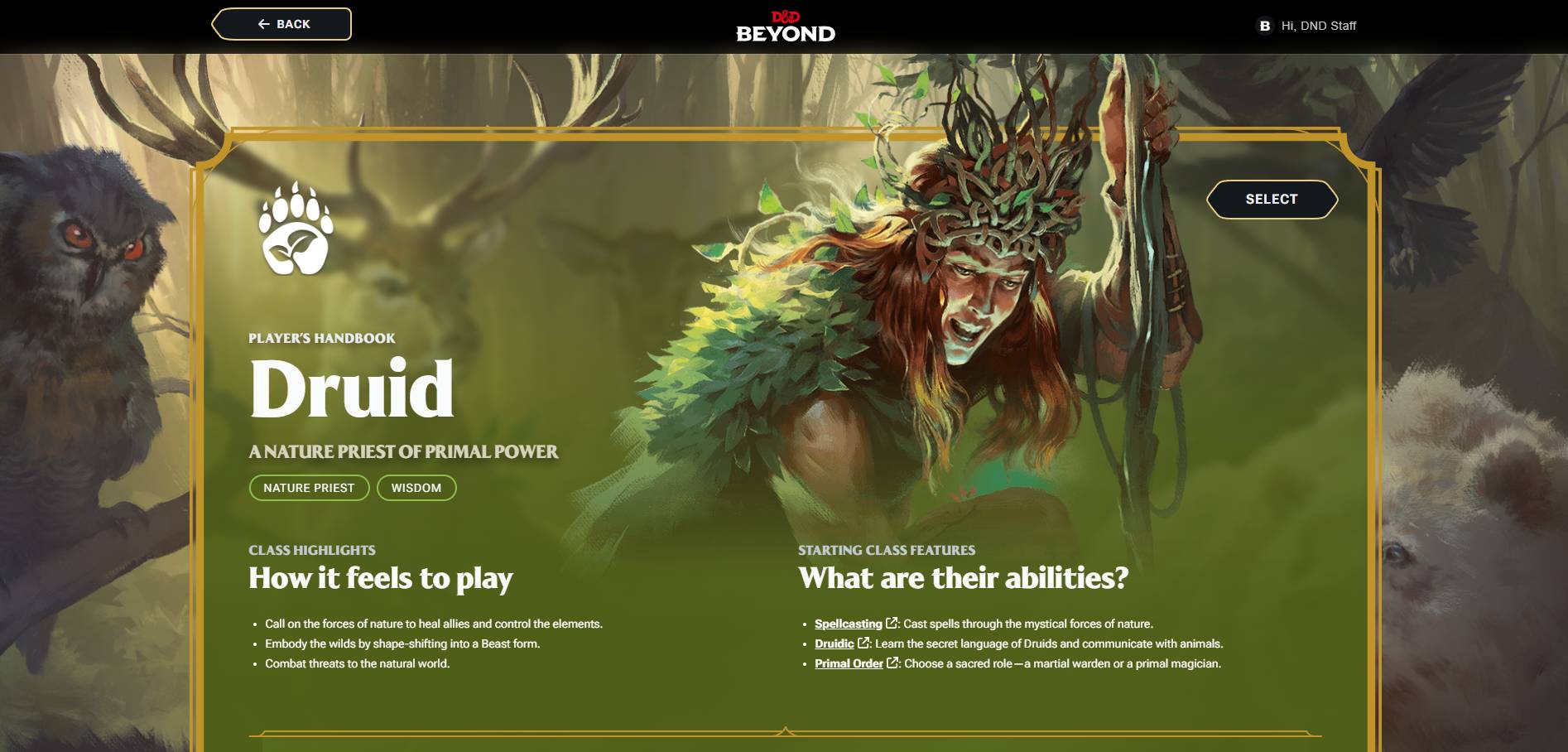
Lead with iconic D&D art, not walls of text and rules details in tiny pop-ups.
Provide easy default selections and let players decide how deeply to customize their characters.
Put the DM back in control of their campaign, including which rules it uses or omits.
Help players see and avoid common builder mistakes, such as forgetting ability score bonuses or picking duplicate skill proficiencies.
Early Concept Video
To be clear, most of what you’ll see in this concept video hasn’t been built yet and is an early design concept.
We want to show you how what we shipped today in Quickbuilder could expand to provide an intuitive and full-featured Character Builder. I'm so excited to share this early design concept with our players, and I look forward to sharing more in the future.
Please know that what you see in the video may not be what is eventually released, after all, the whole point is to learn and incorporate your early feedback.
Feedback Survey
Our team is really excited by this overall direction, but more importantly, we want to know what you think, and what could be even better. We invite you to participate in a feedback survey on the concept video, which will remain open until March 31, 2026.
Update 3/31/2026: The survey is now closed. Thanks to everyone who participated!
The Class tokens and species tokens are amazing and need to be the default method of selection. There has been more than one time as an experienced character builder that I am working on a concept build and lose my place. By the time I get back to where I was at, the inspiration for the character is gone and I just hit delete.
Fantastic! Absolutely fantastic! I love the look of this! Just to be clear, is the early concept video showing a potential redesign of the standard Character Builder or the Quickbuilder?
Very cool tool. I love it as a starting point. 1 big thing is there should be an 'All' option when toggling between 5E and 5.5E. I know that you technically aren't supposed to mix them for 'balance' but it is nice to see all options at once. Every table I've played 5.5E with has allowed 5E species as long as they are not tagged as legacy.
It looks like it will be super useful for new people, especially those that want to scroll around and get a feel for new options. I think you have to have a text description of the random roll if this is for new people as they aren't going to know what the icon means. Also, the areas where you can drag and drop are neat, but there needs to be more information on there about being able to do it and why you would want to. Maybe highlight the stats based on your class that are the suggested highest attributes. This is most useful for super newbies like my mom who is 67 and getting started playing. She is having fun playing the game, but DDB is still confusing.
The survey link doesn't go anywhere when I click it. I did an "all random" set of selections, which is nice and quick, but the "Background" and "Species" text at the bottom doesn't link to a page describing my choice like the link that says "Level 1". If you're like me and bought a lot of DDB content, I don't have it all memorized and would want to look more into the option that was selected before hitting "create" in case I want to roll the dice again. Also the number of options can be overwhelming for some people so being presented with something one thing at a time by hitting the dice from the main page is a less anxiety-inducing method. Please allow it. Others prefer having the big list because that's how their brains work, please keep that.
The species options from Mordenkainen Presents: Monsters of the Multiverse don't seem to be available. I've manually searched for a few of them, made sure I'm set to 5 instead of 5.5, and they're still not appearing.
EDIT: Never mind, there's an option to see the three versions of Eladrin I have access to!
It looks nice so far. It looks like it'll easy for new players or seasoned players trying to get a character together fast. There has been a couple of times where a new player would join last minute and this seems like it would have made things a bit easier and more engaging. Hopefully more efficient.
Looking at the Quickbuilder very briefly, I like what I'm seeing! Good design, actual differentiation for the various subclasses for each of them, and a good couple of switches to go between 5e and 5.5e. c:
Like others have mentioned, the survey link isn't working at time of writing, so putting feedback is a bit... funky. I'll put my thoughts here.
From what I see, the background picker could use a bit more information present - I think it would be good to add which Ability Scores each background increases so I can see things at-a-glance.
I love how everything looks for it, though - that's playing a big part in it all!
I love seeing things like this, I was very curious about the new character builder and what they have so far looks great. It’s clear the D&D Beyond team is putting a lot of care into their work. My players love using Beyond and I’m sure these updates and changes will enhance everyone’s experience.
For anyone who didn't see the video posted in the changelog: When using the quickbuilder, you'll find a colorful easter egg if you name your character "Party Wizard".
For anyone who didn't see the video posted in the changelog: When using the quickbuilder, you'll find a colorful easter egg if you name your character "Party Wizard".
Thank you for mentioning this - very cute by the devs.
Looks nice so far. Don't forget, when you are adding art to this, there's a lot of great iconic old art from previous editions that you likely still have access to. Doll it up!
I really like the idea that the DM can control the rules and other content the players can use. I want to be able to ban subclasses or spells if I think they ruin *my* game. I'm looking at you, Silvery Barbs!
Feedback: Weapons do not get checked automatically as "active", so my character's actions/attacks start off as just "Unarmed strike". Only my experience using D&D digital character sheets told me that 1) I probably DO have a shortsword or bow, and 2) that it probably needs to be "equipped". The type of player who doesn't know DDB or the game rules yet probably needs this box to be checked for them by default.
When viewing the list of Species, Classes, etc.: that's where I found myself wanting one of those "pick randomly" dice-roll buttons. Like, only after viewing all my choices did I realize I'd rather not have to choose. (Was not hard to go back and click on the previous page, though).
When showing species, subclasses, etc., I was trying to figure out what it was and was not showing. I'm in a campaign that is sharing more stuff but I don't see that stuff in the list (I'm guessing I'd have to make my character in the context of that particular campaign for it to show up?).
When creating a new character not in the context of a campaign (so no DM has asserted what options are not valid), I would click to roll randomly and get some really wild backgrounds from Spelljammer, etc. Backgrounds should probably default to just randomly choosing from the PHB backgrounds (a generic choice that would work in almost any campaign). (Unlike classes and species, backgrounds outside the PHB are almost always campaign-specific).





-
View User Profile
-
Send Message
Posted Mar 24, 2026Brilliant.
-
View User Profile
-
Send Message
Posted Mar 24, 2026The Class tokens and species tokens are amazing and need to be the default method of selection. There has been more than one time as an experienced character builder that I am working on a concept build and lose my place. By the time I get back to where I was at, the inspiration for the character is gone and I just hit delete.
-
View User Profile
-
Send Message
Posted Mar 24, 2026Fantastic! Absolutely fantastic! I love the look of this! Just to be clear, is the early concept video showing a potential redesign of the standard Character Builder or the Quickbuilder?
-
View User Profile
-
Send Message
Posted Mar 24, 2026Very cool tool. I love it as a starting point. 1 big thing is there should be an 'All' option when toggling between 5E and 5.5E. I know that you technically aren't supposed to mix them for 'balance' but it is nice to see all options at once. Every table I've played 5.5E with has allowed 5E species as long as they are not tagged as legacy.
-
View User Profile
-
Send Message
Posted Mar 24, 2026Seems to be mainly for the quickbuilding, as the interface doesn't offer a change in class level yet. All characters created by this are at lvl 1
-
View User Profile
-
Send Message
Posted Mar 24, 2026It looks like it will be super useful for new people, especially those that want to scroll around and get a feel for new options. I think you have to have a text description of the random roll if this is for new people as they aren't going to know what the icon means. Also, the areas where you can drag and drop are neat, but there needs to be more information on there about being able to do it and why you would want to. Maybe highlight the stats based on your class that are the suggested highest attributes. This is most useful for super newbies like my mom who is 67 and getting started playing. She is having fun playing the game, but DDB is still confusing.
-
View User Profile
-
Send Message
Posted Mar 24, 2026The survey link doesn't go anywhere when I click it. I did an "all random" set of selections, which is nice and quick, but the "Background" and "Species" text at the bottom doesn't link to a page describing my choice like the link that says "Level 1". If you're like me and bought a lot of DDB content, I don't have it all memorized and would want to look more into the option that was selected before hitting "create" in case I want to roll the dice again. Also the number of options can be overwhelming for some people so being presented with something one thing at a time by hitting the dice from the main page is a less anxiety-inducing method. Please allow it. Others prefer having the big list because that's how their brains work, please keep that.
-
View User Profile
-
Send Message
Posted Mar 24, 2026The species options from Mordenkainen Presents: Monsters of the Multiverse don't seem to be available. I've manually searched for a few of them, made sure I'm set to 5 instead of 5.5, and they're still not appearing.
EDIT: Never mind, there's an option to see the three versions of Eladrin I have access to!
-
View User Profile
-
Send Message
Posted Mar 24, 2026It looks nice so far. It looks like it'll easy for new players or seasoned players trying to get a character together fast. There has been a couple of times where a new player would join last minute and this seems like it would have made things a bit easier and more engaging. Hopefully more efficient.
-
View User Profile
-
Send Message
Posted Mar 24, 2026Looks amazing! Good job honestly. Looking forward to the general overhaul
-
View User Profile
-
Send Message
Posted Mar 24, 2026Looking at the Quickbuilder very briefly, I like what I'm seeing! Good design, actual differentiation for the various subclasses for each of them, and a good couple of switches to go between 5e and 5.5e. c:
Like others have mentioned, the survey link isn't working at time of writing, so putting feedback is a bit... funky. I'll put my thoughts here.
From what I see, the background picker could use a bit more information present - I think it would be good to add which Ability Scores each background increases so I can see things at-a-glance.
I love how everything looks for it, though - that's playing a big part in it all!
-
View User Profile
-
Send Message
Posted Mar 24, 2026I love seeing things like this, I was very curious about the new character builder and what they have so far looks great. It’s clear the D&D Beyond team is putting a lot of care into their work. My players love using Beyond and I’m sure these updates and changes will enhance everyone’s experience.
-
View User Profile
-
Send Message
Posted Mar 24, 2026Looks cool! Finally.
-
View User Profile
-
Send Message
Posted Mar 24, 2026Wow that looks really good!
I like the UI and the fade in zoom after picking.
-
View User Profile
-
Send Message
Posted Mar 24, 2026For anyone who didn't see the video posted in the changelog: When using the quickbuilder, you'll find a colorful easter egg if you name your character "Party Wizard".
-
View User Profile
-
Send Message
Posted Mar 24, 2026Thank you for mentioning this - very cute by the devs.
-
View User Profile
-
Send Message
Posted Mar 24, 2026This definitely feels fairly slick and easy for a totally new player. Love the direction. The planned product shown in the video looks nice.
-
View User Profile
-
Send Message
Posted Mar 25, 2026Looks nice so far. Don't forget, when you are adding art to this, there's a lot of great iconic old art from previous editions that you likely still have access to. Doll it up!
-
View User Profile
-
Send Message
Posted Mar 25, 2026I really like the idea that the DM can control the rules and other content the players can use. I want to be able to ban subclasses or spells if I think they ruin *my* game. I'm looking at you, Silvery Barbs!
-
View User Profile
-
Send Message
Posted Mar 25, 2026Feedback: Weapons do not get checked automatically as "active", so my character's actions/attacks start off as just "Unarmed strike". Only my experience using D&D digital character sheets told me that 1) I probably DO have a shortsword or bow, and 2) that it probably needs to be "equipped". The type of player who doesn't know DDB or the game rules yet probably needs this box to be checked for them by default.
When viewing the list of Species, Classes, etc.: that's where I found myself wanting one of those "pick randomly" dice-roll buttons. Like, only after viewing all my choices did I realize I'd rather not have to choose. (Was not hard to go back and click on the previous page, though).
When showing species, subclasses, etc., I was trying to figure out what it was and was not showing. I'm in a campaign that is sharing more stuff but I don't see that stuff in the list (I'm guessing I'd have to make my character in the context of that particular campaign for it to show up?).
When creating a new character not in the context of a campaign (so no DM has asserted what options are not valid), I would click to roll randomly and get some really wild backgrounds from Spelljammer, etc. Backgrounds should probably default to just randomly choosing from the PHB backgrounds (a generic choice that would work in almost any campaign). (Unlike classes and species, backgrounds outside the PHB are almost always campaign-specific).