
There is some weirdness around when a token becomes bloody/below half health:
* In my DM view, the token art gets kind of a see-through red overlay to indicate that it is bloody. However, my players do not report this same overlay happening on the tokens in their view.
Open the settings and check that "Players can see when tokens have been bloodied" is enabled
* Bloody does not show as a condition when you click on the token, for the DM or for the players.
That's because it's not a condition that can be triggered any other way than being below half your maximum hit points, which Maps handles automatically
* There is no condition toggle for bloody. A token can only show bloody (and again, only to the DM) if its hit points are below half.
Yep, that's because that's how Bloodied works and Maps handles toggling it on and off automatically
Bloodied works however the DM wants it to work. It's a condition like any other and I should be able to apply it, or not, at will.
I mean, the automation is nice and handy, but what if I want to make a creature appear bloody if its hit points don't actually agree? Or vice versa? I'm thinking things like multistage fights and I don't want to have to manually fudge a tokens HP to force a status indicator.
Bloodied works however the DM wants it to work. It's a condition like any other and I should be able to apply it, or not, at will.
I mean, the automation is nice and handy, but what if I want to make a creature appear bloody if its hit points don't actually agree? Or vice versa? I'm thinking things like multistage fights and I don't want to have to manually fudge a tokens HP to force a status indicator.
From what I've seen, automatic bloodied indicator is something a lot of people were asking for. You unfortunately can't have it both ways
It looks like there's a setting for this (click the top-right hamburger icon and click 'Settings'): "Players can see when tokens have been bloodied" . Since some player abilities are based on this, I think it's important that they know when a monster (especially a boss) is bloodied, but I can imagine wanting to hide it for a multi-stage boss. Being able to override it on specific monsters would be a good feature.
Anyone else thrown for a massive loop when all of your uploaded maps and the pre-loaded maps auto-sorted to alphabetical without the option to leave it as it was (upload order)? I had a general flow of the campaign set up with the order of the maps and grouped them for ease of switching, and now I have to search and find the correctly named map. VERY glad I separately keep an excel file for progression with names and details of all my maps. Love that the maps can be sorted, but it should be an option to sort (upload date, alphabetical, custom ordering, etc.).
Uploaded maps can be sorted by date in the Map Browser.
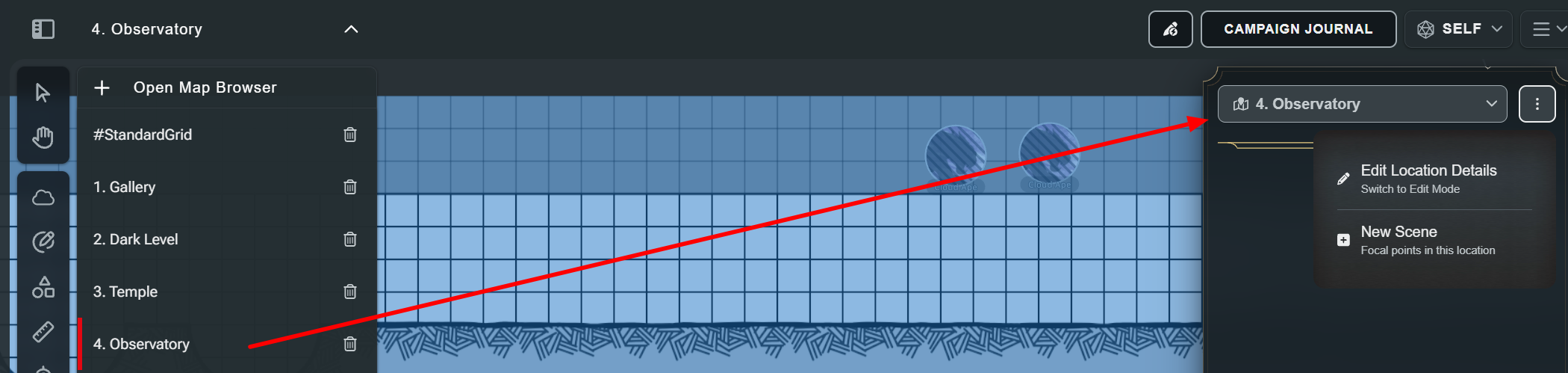
If you mean the game map dropdown, you can rename your maps in the Scene Prep, so it's easy enough to number them 1, 2, 3 etc.
Loving the idea of a toggle for the Bloodied condition/status. My table has been using the red ring for now.
Apologies if this has been mentioned before, I did not see it in a search. Busy combat situations can, at times, get cumbersome to review logs for dice rolls. I would like to suggest an ability to to toggle or control the length of time digital dice rolls remain on the display. Personally, an option to have the rolled dice display until manually cleared would be optimal for my table. However, a setting to control the time the rolls remain on display would also be helpful.
Anyone else thrown for a massive loop when all of your uploaded maps and the pre-loaded maps auto-sorted to alphabetical without the option to leave it as it was (upload order)? I had a general flow of the campaign set up with the order of the maps and grouped them for ease of switching, and now I have to search and find the correctly named map. VERY glad I separately keep an excel file for progression with names and details of all my maps. Love that the maps can be sorted, but it should be an option to sort (upload date, alphabetical, custom ordering, etc.).
Uploaded maps can be sorted by date in the Map Browser.
If you mean the game map dropdown, you can rename your maps in the Scene Prep, so it's easy enough to number them 1, 2, 3 etc.
Appreciate this! That's what I'm doing for the dropdown - where my main issue was. I just also have almost 200 maps so it was an unfortunate workload.
Rollback Post to RevisionRollBack
To post a comment, please login or register a new account.
Open the settings and check that "Players can see when tokens have been bloodied" is enabled
That's because it's not a condition that can be triggered any other way than being below half your maximum hit points, which Maps handles automatically
Yep, that's because that's how Bloodied works and Maps handles toggling it on and off automatically
Find my D&D Beyond articles here
Bloodied works however the DM wants it to work. It's a condition like any other and I should be able to apply it, or not, at will.
I mean, the automation is nice and handy, but what if I want to make a creature appear bloody if its hit points don't actually agree? Or vice versa? I'm thinking things like multistage fights and I don't want to have to manually fudge a tokens HP to force a status indicator.
From what I've seen, automatic bloodied indicator is something a lot of people were asking for. You unfortunately can't have it both ways
Find my D&D Beyond articles here
It looks like there's a setting for this (click the top-right hamburger icon and click 'Settings'): "Players can see when tokens have been bloodied" . Since some player abilities are based on this, I think it's important that they know when a monster (especially a boss) is bloodied, but I can imagine wanting to hide it for a multi-stage boss. Being able to override it on specific monsters would be a good feature.
Anyone else thrown for a massive loop when all of your uploaded maps and the pre-loaded maps auto-sorted to alphabetical without the option to leave it as it was (upload order)? I had a general flow of the campaign set up with the order of the maps and grouped them for ease of switching, and now I have to search and find the correctly named map. VERY glad I separately keep an excel file for progression with names and details of all my maps. Love that the maps can be sorted, but it should be an option to sort (upload date, alphabetical, custom ordering, etc.).
Uploaded maps can be sorted by date in the Map Browser.
If you mean the game map dropdown, you can rename your maps in the Scene Prep, so it's easy enough to number them 1, 2, 3 etc.

Hello,
Loving the idea of a toggle for the Bloodied condition/status. My table has been using the red ring for now.
Apologies if this has been mentioned before, I did not see it in a search. Busy combat situations can, at times, get cumbersome to review logs for dice rolls. I would like to suggest an ability to to toggle or control the length of time digital dice rolls remain on the display. Personally, an option to have the rolled dice display until manually cleared would be optimal for my table. However, a setting to control the time the rolls remain on display would also be helpful.
Thank you from one DM and Crew.
Appreciate this! That's what I'm doing for the dropdown - where my main issue was. I just also have almost 200 maps so it was an unfortunate workload.


