




Scene Prep is a new tool where you write, organize, and reference everything you need to run a scene, and it's live right now in D&D Beyond's Maps VTT.
Now, your prep lives right where you're already playing. You can drop scene pins on the map, jump straight to the notes for that moment, and stop hunting through tabs and scrolling through documents mid-session.
Scene Prep at a Glance
Notes from Expert DMs
Scene Prep is written by the same people who write our books and adventures, so you can pull from their pre-crafted prep notes to help inspire your games.
Prep Without a Map
If you don't play on a tactical map, Scene Prep still works. Our new "Theater of the Mind Organizer" map, available for free in the Basic Maps section to all users, lets you stay organized for Theater of the Mind encounters, and even at your in-person table.
Improving D&D Beyond Drops
Alongside the launch, we've just made your existing D&D Beyond subscription better:
- We've upgraded five weekly Drop-in Encounters from D&D Beyond Drops to include built-in Scene Prep material. That means you'll now find plot hooks, read-aloud text, and reasons the encounter is happening.
- Soon, we'll have the rest of the back catalog of Drop-in Encounters upgraded with Scene Prep too!
- Many of the future Drop-in Encounters will include Scene Prep.
Five Free Encounters
For people who don't have a subscription, we've created five new Drop-in Encounters and added them to every D&D Beyond account, free or paid. So everyone can get some inspiration on what good Scene Prep could look like and benefit from some surprises to throw at your players.
Okay, let's dig in!
- Why Scene Prep Exists
- How to Use Scene Prep
- Prep Without a Map
- Five Free Encounters, Plus Weekly Subscriber Drops
Why Scene Prep Exists
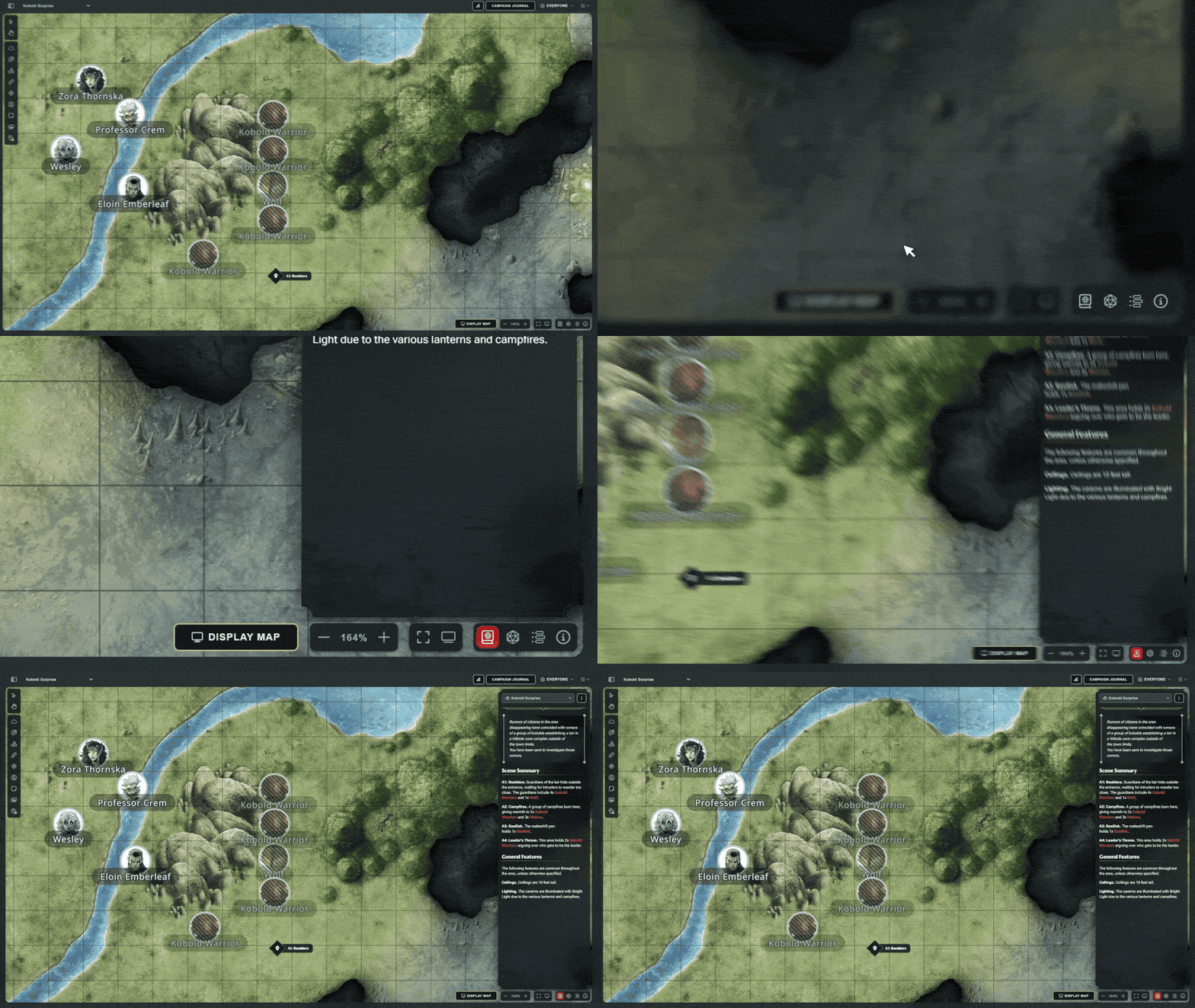
Scene Prep is built on four ideas:
- All in one place. Prep that lives where you play. It's in Maps, and attached to the spot on the map where the scene actually happens.
- Crafted by Experts. A framework built with our game designers, veteran DMs, and first-time DMs to start from, or craft your own template instead.
- Play your way. Works with or without a map, including in-person play.
- An expanding library. Pre-prepped, runnable encounters fromD&D Beyond Drops, with more every week.
How to Use Scene Prep
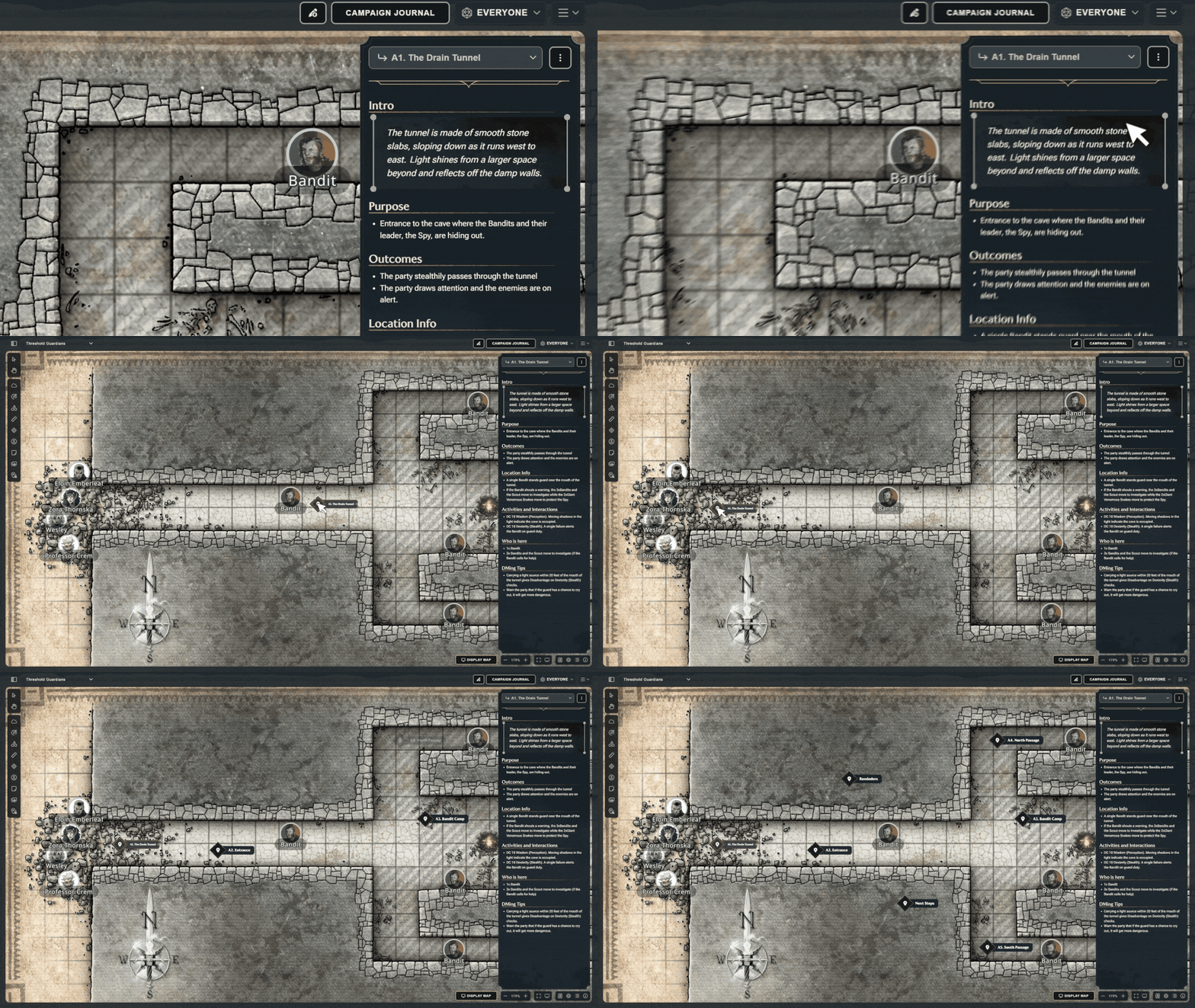
The fastest way to learn Scene Prep is on a map where the prep is already written. Open one of the five free Drop-in Encounters from the Map Browser and follow along.
Open the Panel
From D&D Beyond's Maps VTT, click the new Scene Prep icon (P) to open the panel on the right.
The panel starts by showing the prep for the Location you have loaded, whether that's a map or our Theater of the Mind organizer, and you'll see every note written for what might go down there. On the map itself, you'll see the scene pins. They're visible only to the DM, and each one represents a different scene that could happen in that area. Click a pin to jump to its prep.
Create a Scene
Open the triple-dot menu in the panel and choose Add a Scene.
When you create a new scene (or open a location you haven't written any prep for yet), Scene Prep gives you a starting framework, built with input from our game designers, veteran DMs, and novice DMs. It's there to help you think through the kind of information you want ready to hand. It's also entirely optional, and easy to replace with your own format.
Write Your Prep
Click Edit and start writing. You can apply different headers and experiment with whatever formatting works for you, and everything saves as you type, so there's nothing to lose if you close the tab.
One piece of advice from the designers who helped shape the framework: less is more. Bullet points, not paragraphs. A few sections, not pages and pages. You want just enough in front of you to feel comfortable and confident, without getting lost scrolling and hunting for an answer. Trust your improv skills!
Place and Hide Scene Pins
Once you've created a scene, place its pin on the map and drag it wherever it belongs.
If you have a lot of scenes, a map can start to get busy fast. Click the pin visibility icon (L) to hide most of them. They stay slightly visible on purpose, so you still get the reminder that your players are about to walk into a new scene. But in transparency mode, you can see and interact with the rest of the map much more easily.
Rename Maps and Sort the Dropdown
Two smaller additions: while you're in Edit mode for the top-level Location prep, editing the name of that location also edits the map name in the Map Selector dropdown, which now sorts alphabetically. Together they make a long list of maps much easier to organize and navigate.
Use It Your Way
Scenes are the obvious use, but they won't be the only one. Use pins as reminders. Build a store with inventory and prices. Mark treasure, or a trap, or the weird thing in the room that your players are definitely going to investigate and trigger an exposition drop over.
Prep Without a Map
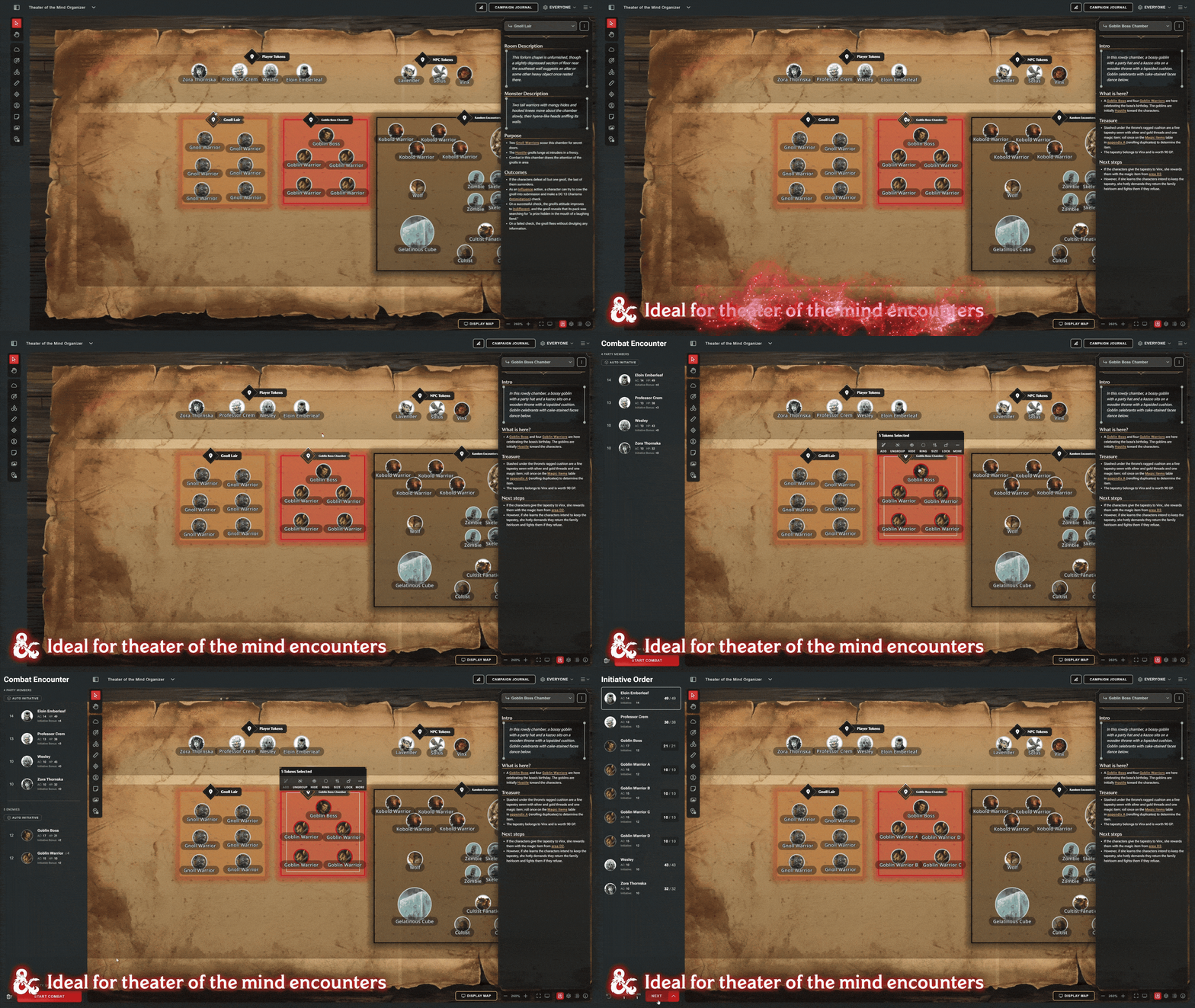
DMing Theater of the Mind or in-person tables needs the same prep, so we wanted to make sure Scene Prep worked with or without a battle map.
That's what the Theater of the Mind Organizer map is for. It's in the "Basic Maps" section of the Map Browser on every D&D Beyond account, and it gives you somewhere to hang your scenes when there's no battlemap involved — useful for Theater of the Mind, and useful if you play in person and just want digital support to stay organized.
Five Free Encounters, Plus Weekly Subscriber Drops
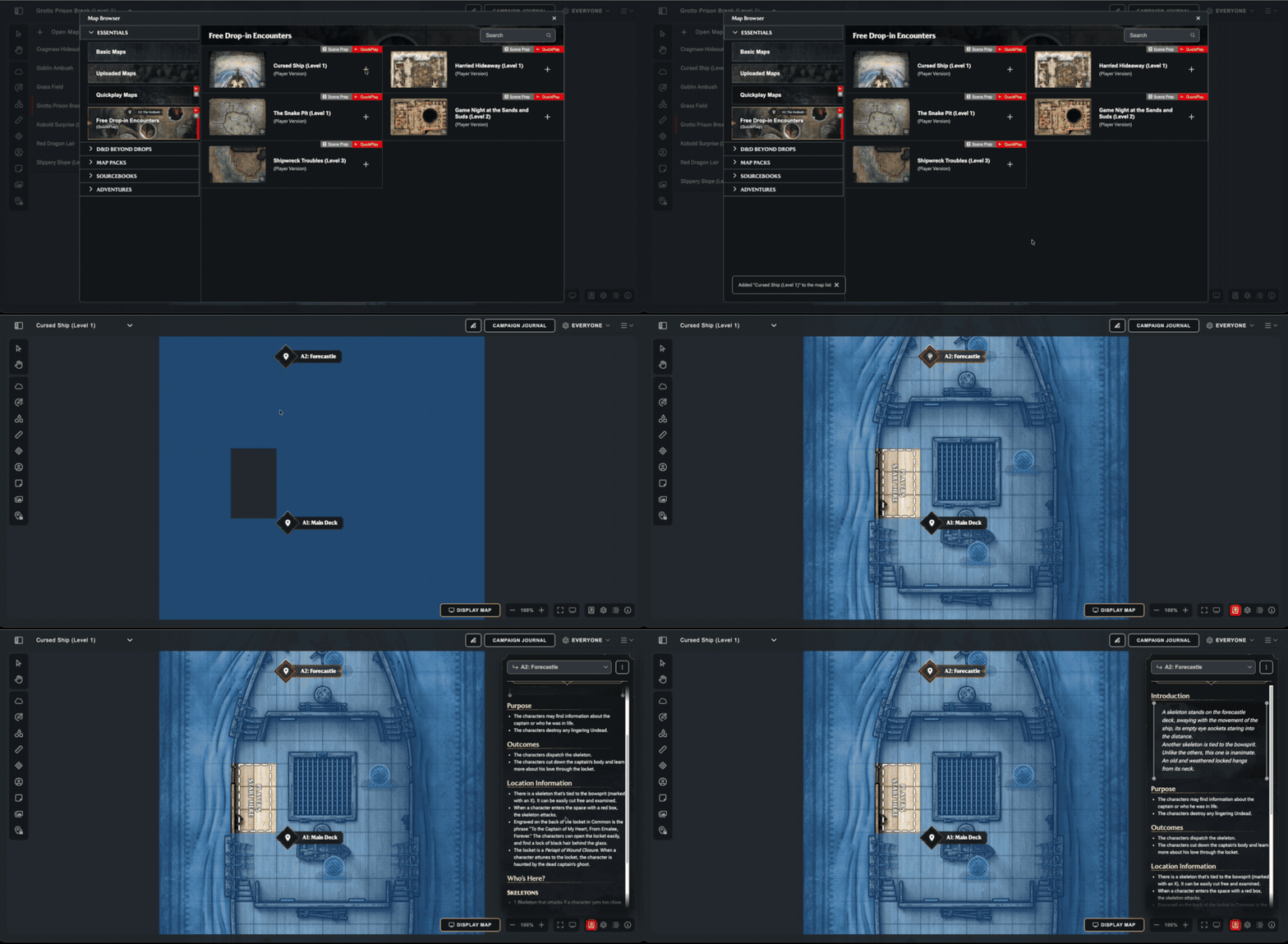
Five free ready-to-run encounters. No prep, no extra tabs.
If DMing has ever looked like more work than you wanted to sign up for, this is the place to start. Five Drop-in Encounters are now available on every D&D Beyond account, free or paid, with the Scene Prep already written. They're ready to run with story, plot hooks, read-aloud text, and tokens placed.
| Free Drop-in Encounter | What Happens |
|---|---|
| Cursed Ship (Level 1) | Your party must investigate a ship manned by Undead. Will they defeat the cursed foes or join the skeleton crew? |
| Game Night at the Sand and Suds (Level 2) | A quiet night in the tavern should be a well-deserved rest for the party. Unfortunately, some people can’t just leave well enough alone. |
| Harried Hideaway (Level 1) | Your party is sent to recover belongings from an overrun cottage. Will your players snag the goods, or get tangled up in the growing mystery? |
| Shipwreck Troubles (Level 3) | Can your players put an end to a nearby town’s aquatic troubles, or will they find themselves swimming with the fishes? |
| The Snake Pit (Level 1) | Your party stumbles across the subterranean lair of Krait and his underlings! Can your party defeat them, or will you become victims of the serpent’s sting? |
D&D Beyond Drops Storied Encounters
A new Drop-in Encounter releases to all subscribers every week as part of Drops, and the library keeps growing. They're maps with tokens already placed: a bandit ambush, a demonic cult summoning, accidentally wandering into a mummy's lair. The kind of one-off encounter you can drop into your campaign when your players do something unexpected, or when the session needs a jolt.
One of the biggest pieces of feedback we heard was that the maps were cool, but they needed narrative to be genuinely useful. Now, with Scene Prep, they have it! We've upgraded five of the existing Drop-in Encounters, and the rest should be upgraded shortly.
Tell Us What to Build Next
Scene Prep is the next stage in the DM Tools project, and it's built around one goal: helping you keep the game moving.
If you've ever found yourself hunting through tabs and notes while your players wait for an answer, give it a try. The hope is that it lets you close another tab, and keeps more of what you need at your fingertips without burying you in pages of prep or making you search for exactly the right thing at exactly the wrong moment.
Have feedback, or an idea for what should come next? Jump into the official D&D Discord or the r/dndbeyond subreddit, where you can find us as WOTC_Zac.
-
View User Profile
-
Send Message
Posted Aug 31, 2026This is a quantum leap for me as a DM using Maps. I love it! I literally can't count the uses this'll have for me!
-
View User Profile
-
Send Message
Posted Aug 31, 2026Thats when the UXR team rolls 20. thats GREAT! (i wish i had that when i ran castle ravenloft XD)
THANK YOU BEYOND!
-
View User Profile
-
Send Message
Posted Aug 31, 2026Thank you for the great work.
-
View User Profile
-
Send Message
Posted Aug 31, 2026Give me Dynamic Lighting and I'll sign the Pact of the Maps Developer. Love the work y'all have been putting out recently.
-
View User Profile
-
Send Message
Posted Aug 31, 2026VERY NICE!!!!
-
View User Profile
-
Send Message
Posted Aug 31, 2026This is awesome sauces. My last wish: Dnd Beyond give me Dynamic Lighting and my soul is yours
-
View User Profile
-
Send Message
Posted Aug 31, 2026I don't know if it is only me. But when typing in the prep notes, it also toggles the hot keys at the same time. So i.e if I press the letter L while typing in the prep box, I also toggle lock/unlock scene pins
-
View User Profile
-
Send Message
Posted Aug 31, 2026Fine addition ;) Good work
-
View User Profile
-
Send Message
Posted Aug 31, 2026Yes please. That's the one thing I need to come back to playing on Maps.
-
View User Profile
-
Send Message
Posted Aug 31, 2026I've been very happy with every update we've received for Maps so far, but what's the point of this(I'm only referring to the part about rearranging maps; the rest sounds really good.)? What on earth is the point of having the maps sorted alphabetically? You can already sort them that way in the Uploaded Maps section, so why shouldn't I just get them that way from there? Could we please have the option to set this manually ourselves? As it is now, it's completely ruined my campaign setup. Either undo it or at least give us the option to decide for ourselves.
-
View User Profile
-
Send Message
Posted Aug 31, 2026please tell me this is not what they meant when they promised a mapless encounter builder update.
-
View User Profile
-
Send Message
Posted Aug 31, 2026If this can be pre-made for existing official adventures, that'd be useful.
Besides this, the most important thing Maps still needs to be a practical VTT is line-of-sight for every PC.
-
View User Profile
-
Send Message
Posted Aug 31, 2026I don't think so. At GenCon and in a couple recent interviews they talked about supporting a bunch of different experiences/playstyles, and while they're obviously investing a lot into making Maps a better tool, they also specifically called out support tools for people using physical maps and miniatures or theatre-of-the-mind. From what they've said elsewhere (like the Mid-Year Update they posted awhile ago,) they're working on updating the DM tools and Encounter Builder but it sounds like it's a little bit further down their development pipeline.
-
View User Profile
-
Send Message
Posted Aug 31, 2026We have much more in store for giving people DM tools without using Maps. This is something the team could do quickly with scene prep.
-
View User Profile
-
Send Message
Posted Aug 31, 2026thanks
-
View User Profile
-
Send Message
Posted Aug 31, 2026Another great feature!
-
View User Profile
-
Send Message
Posted Aug 31, 2026if you could decide what the theme of the next few drops was it could be anything what would it be also would you guys want subclasses from this?or races?or more backrounds
-
View User Profile
-
Send Message
Posted Aug 31, 2026seriously, Dynamic Lighting is all I need too!
-
View User Profile
-
Send Message
Posted Sep 1, 2026Would be really interesting to see player made scenarios! Similar to homebrew content. I've made some pretty fun one-shots over my years, and I'd love to share them with other DMs who just can't be bothered with all the work
-
View User Profile
-
Send Message
Posted Sep 1, 2026Guys does anyone have any ideas for maps I need some for my starter players to print out because I can’t use my phone at school