




Were you ever baffled by our search finding zero results for firebolt? Maybe you were thwarted by a typo in a monster name? Perhaps you wasted too much time wading through books you don’t own? Not anymore. We rebuilt D&D Beyond search from the ground up, so you find the right rule, monster, or magic item fast.
Hi! Elliot (Core Site Navigation PM) and Adela (Character Tools and back end rebuild PM) here, reporting on our efforts to improve DDB’s site search.
Elliot: Search was a last-minute feature. Nine years ago, just weeks before launch, our lead developer showed up with a hefty Elasticsearch book, a can of iced coffee, and a fighter-pilot-grade headset, built it single-handedly, and moved on to the next fire. Since then, our search languished, slowly devolving into a gibbering mouther of irrelevant results.
Adela here: We began by exploring advanced rules search in Maps but pivoted when we realized that users had trouble with search in general, not only when they searched for rules. Players and DMs couldn’t find what they needed when they accidentally misspelled or capitalized a word, missed a correct result buried beneath forum postings, or had to dig through a mix of owned and purchase-able content. We could fix so much more!
We listened to the community feedback you shared, and rebuilt search so you can find the content you want, faster. Search now has autocomplete and autocorrect, and understands common misspellings, synonyms, and abbreviations. Typing “dark vision” with a space used to put Mordenkainen’s Private Sanctum at the top of your results, but now you get Darkvision.
The new filters let you narrow results by rule set, by whether the content is owned or shared, and even searches within a specific book. It reduces redundant search results, matches the results to the headers in our books, and ranks them by relevance. You can also skip the results page and jump straight to the page you want from the search bar. We even show you a preview of the content of the top result, so you don’t even have to click into another page. We also excluded the forums from the site search, to avoid drowning you in unofficial results.
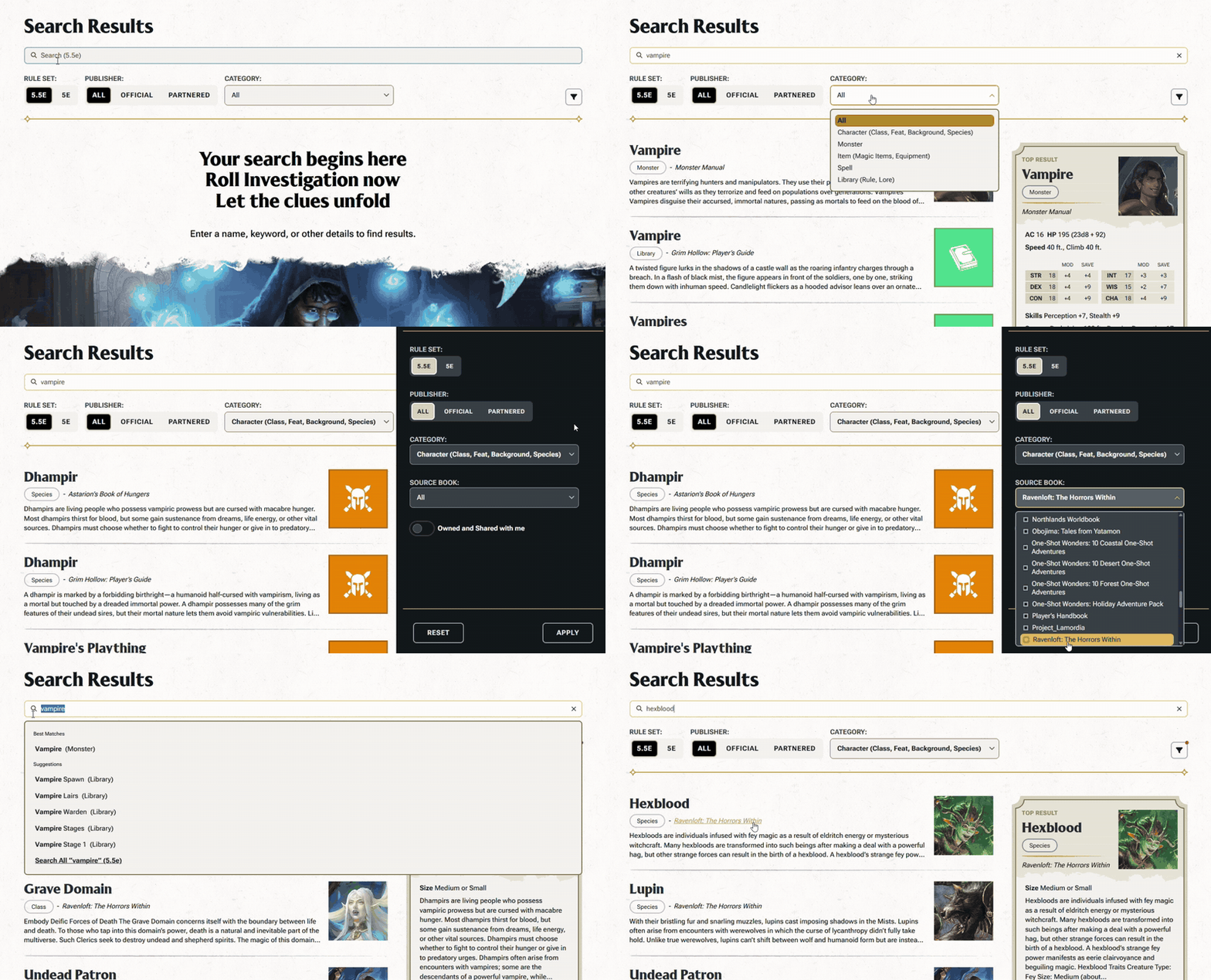
How it works: Search looks through every book we’ve published on DDB, and potential results are ranked by how relevant they are to what you typed. Canonical entries like spells, rules, and monsters are weighted higher. We can also hand-map words and phrases that keyword search would miss.
That means the abbreviations D&D players use all the time, like CR or AC, still turn up the right results (for challenge rating and armor class), even without an exact keyword match. It also allows us to continually tune our search algorithms to get you better and better results.
All these changes together take us from the previous basic keyword and overly rigid search to a *modern* search function that’s easy to use so that you get to the right rule, monster, or magic item for your game.
This is a significant improvement from where we were before, and based on your feedback, we plan to keep tuning and improving it! So, Give it a whirl and let us know what you think!
-
View User Profile
-
Send Message
Posted Oct 30, 2026This is amazing guys, however it seems that is lacks on a smaller notebook screens where I still can't "zoom out" and don't see the results properly. It seems to be affected primarily by windows settings so to zoom out, I have to change my screen settings. Also the search is not consistently everywhere, is that planned? When you go through rules>browse>spells, it's the old search - do you plan to ship it out there as well?
-
View User Profile
-
Send Message
Posted Oct 30, 2026This is a HUGE improvement! Tysm!
-
View User Profile
-
Send Message
Posted Oct 30, 2026I still can't find "how to run a shop" in the Search. I know it's in the 2014 DMG.
-
View User Profile
-
Send Message
Posted Oct 30, 2026This is a happy day.
-
View User Profile
-
Send Message
Posted Oct 30, 2026This is such a MAJOR quality of life improvement. THANK YOU!
-
View User Profile
-
Send Message
Posted Oct 30, 2026AMAZING!! Thank you so much for your hard work on this!!!
-
View User Profile
-
Send Message
Posted Oct 30, 2026My ask is making it so you can sort to owned content in the monsters, equipment, races and encounter builders and more so it's easier to locate all of your own content without having to toggle on all of the sources individually.
-
View User Profile
-
Send Message
Posted Oct 30, 2026THANK YOU!!! This has been one of the most frustrating things! I’m so glad to see it’s finally being addressed!
-
View User Profile
-
Send Message
Posted Oct 30, 2026Thank you! Thank you! Thank you! Thank you! Thank you! Thank you! Thank you! Thank you! Thank you! Thank you! Thank you! Thank you! Thank you! Thank you! Thank you! Thank you! Thank you! Thank you! Thank you! Thank you! Thank you! Thank you! Thank you! Thank you! Thank you! Thank you! Thank you! Thank you! Thank you! Thank you! Thank you! Thank you! Thank you! Thank you! Thank you! Thank you! Thank you! Thank you! Thank you! Thank you! Thank you! Thank you! Thank you! Thank you! Thank you! Thank you! Thank you! Thank you! Thank you! Thank you! Thank you! Thank you! Thank you! Thank you! Thank you! Thank you! Thank you! Thank you! Thank you! Thank you! Thank you! Thank you! Thank you!
-
View User Profile
-
Send Message
Posted Oct 31, 2026try Running a Business, DMG 2014
-
View User Profile
-
Send Message
Posted Oct 31, 2026Would love to see 5.5e / 5e as individual tick options rather than an either/or toggle. As it currently stands the 5.5e option will filter out older (but not necessarily legacy) monsters and items that have no 5.5e equivalent.
-
View User Profile
-
Send Message
Posted Oct 31, 2026Can you let us buy the books we don't have like Hold Back the Dead?
Or are such off limits results just going to be hidden from us now?
-
View User Profile
-
Send Message
Posted Oct 31, 2026Oh, this is a wonderful improvement! Thank you so much, team! I appreciate you all a lot!
-
View User Profile
-
Send Message
Posted Oct 31, 2026Now fix Marketplace navigation. Its absolutely unintuitive how we're supposed to be able to browse items. If I'm not sure what category the book is in, its buried in menu hell for me to find it.
-
View User Profile
-
Send Message
Posted Oct 31, 2026Fantastic - thank you!
-
View User Profile
-
Send Message
Posted Oct 31, 2026That's pretty spiffy... much appreciated!
-
View User Profile
-
Send Message
Posted Oct 31, 2026This is a significant improvement overall, but could use some tweaks. It needs an option to search 5e and 5.5 simultaneously. It also needs an option to save settings, so it always searches your preferred edition and only books you have access to without having to change every time.
Then these options need to come to the feats, magic items, monsters, etc. pages.
-
View User Profile
-
Send Message
Posted Oct 31, 2026Good work!