Salutations! I’m Kevin, and I manage the user experience design team for D&D Beyond. I'm here to talk to you today about D&D Beyond's new Quickbuilder and our planned refurbishment of the Character Builder tool.
I have the pleasure of inviting you behind the proverbial DM screen to give feedback on our new Quickbuilder—as it stands today—as well as some early concepts for the future improvements to the Character Builder.
We want D&D Beyond's tools to be the best way to play D&D your way—so we need your help!
At the end of this post, we share a concept video and a feedback survey where you can help steer the direction of our development. The survey will remain open until March 31, 2026, so be sure to get your feedback in before then if you'd like to help contribute towards the future of this tool!
Update 3/31/2026: The survey is now closed. Thanks to everyone who participated!
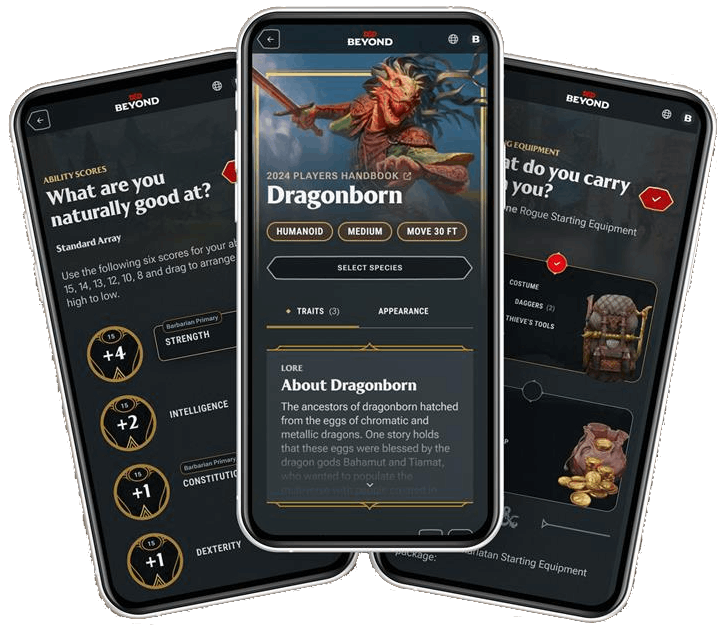
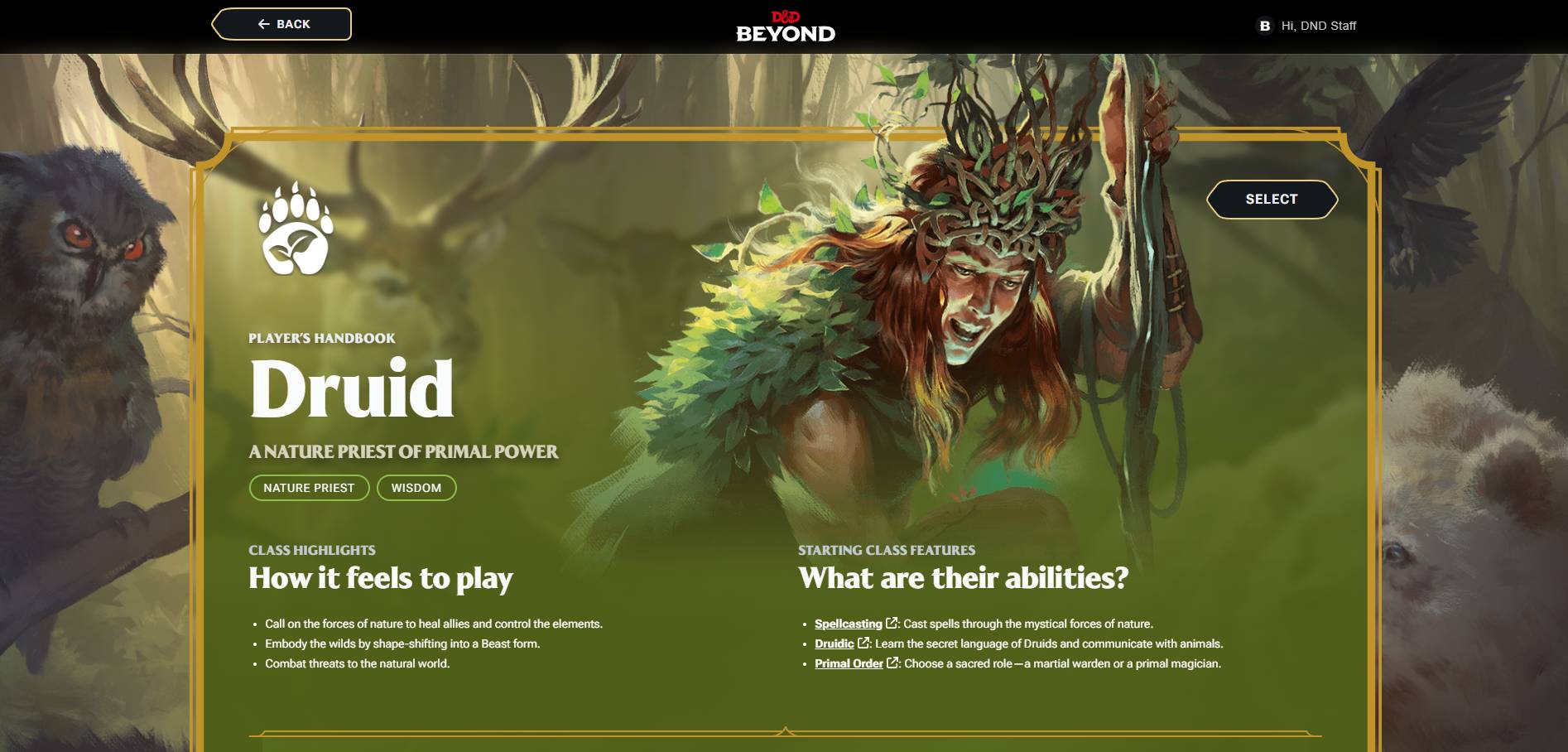
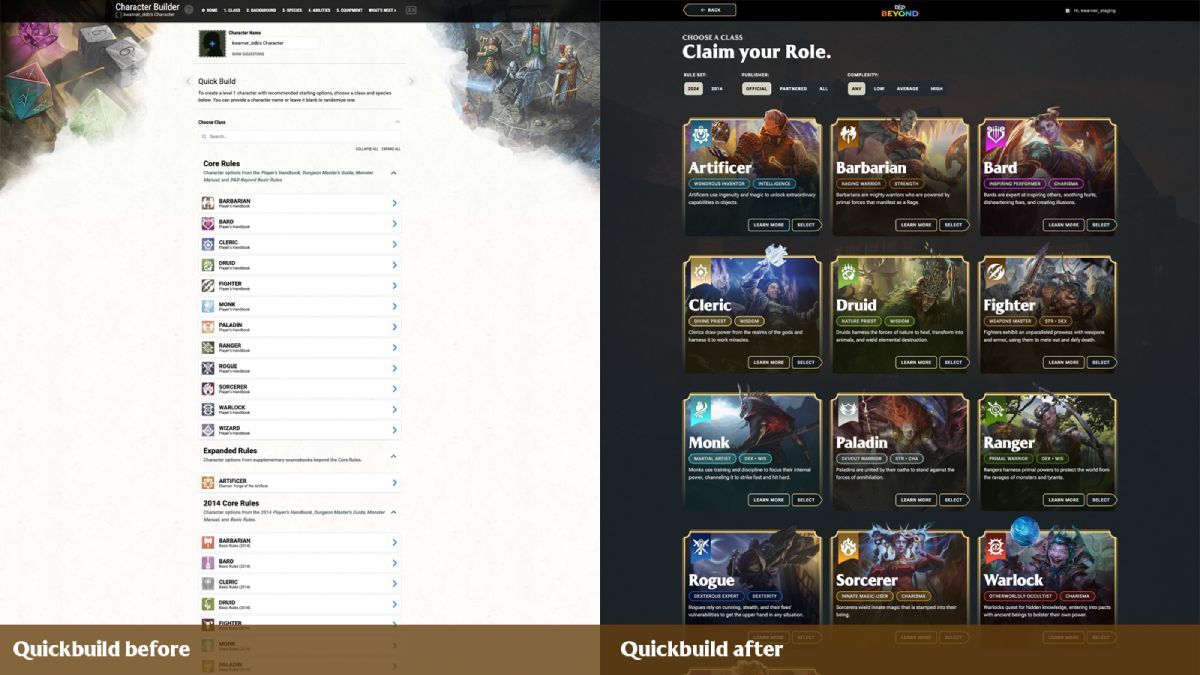
Today, we’ve launched D&D Beyond's new Quickbuilder as our first step towards our overall vision of improving the character creation experience on D&D Beyond for all players.
Eventually, we want the Character Builder to be easier to use, more fully support the game rules, suggest smart defaults, stay flexible for customization, and put more emphasis on inspiration and fun.
We’re starting with an incremental update to our Quickbuilder method of character creation, which has always been focused on letting new players easily make a level 1 character.
Compared to our standard builder, the Quickbuilder doesn’t see much use, which makes it a great place to try out new approaches, test new tech, and get feedback with little risk of disrupting your ongoing games.
Design Principles
Our design process started with talking to players about their pain points, and conducting player research labs on prototypes (For those interested in User experience research, the prototype sessions were qualitative, moderated 1:1 sessions with an average of 8 participants per round, split across two prototype rounds).
Our goal is to learn not only about the challenges with the current builder but also about players’ end-to-end D&D experience.
Here are some of the design principles we developed from those early conversations and research studies that have guided the design explorations and concepts we’re showing you today.
You shouldn’t have to be an expert in the rules to build a character.
It should feel great to use across all device sizes, from phones to 4K monitors.
Lead with iconic D&D art, not walls of text and rules details in tiny pop-ups.
Provide easy default selections and let players decide how deeply to customize their characters.
Put the DM back in control of their campaign, including which rules it uses or omits.
Help players see and avoid common builder mistakes, such as forgetting ability score bonuses or picking duplicate skill proficiencies.
Early Concept Video
To be clear, most of what you’ll see in this concept video hasn’t been built yet and is an early design concept.
We want to show you how what we shipped today in Quickbuilder could expand to provide an intuitive and full-featured Character Builder. I'm so excited to share this early design concept with our players, and I look forward to sharing more in the future.
Please know that what you see in the video may not be what is eventually released, after all, the whole point is to learn and incorporate your early feedback.
Feedback Survey
Our team is really excited by this overall direction, but more importantly, we want to know what you think, and what could be even better. We invite you to participate in a feedback survey on the concept video, which will remain open until March 31, 2026.
Update 3/31/2026: The survey is now closed. Thanks to everyone who participated!
Quickbuilder is a great new tool for 1-shots and new players etc, though it makes some weird choices atm by default, hopefully that gets tweaked.
What I REALLY want is the main character builder to be a bit more user friendly, especially for those of us that hate the pre-made backgrounds. I tried it last night, after both playing D&D and using websites for decades and I still had a job finding how to add my languages, all the skill and tool proficiencies I was entitled to, how to add the origin feat etc from the custom background etc. Took me nearly an hour in total with the character already planned out beforehand. Overall it's a good character maker, and I'm sure I'd get used to it in time, but I'd still prefer if it was made a bit more idiot proof for people like me, lol.
I see some appeal if you don't have all your character ready in your mind and want to throw one or two options as random and find something that fits nicely together, or even more so try to work with what it gives! My first character was a high dexterity Kenku Paladin with the criminal background... But it worked really well.
I tried out the new quick builder on the android app. I encountered an annoying issue when trying to view the details of the background options. Every time I viewed those details, trying to get back to the character builder would bring me back out of the builder and I would have to start over.
I also found it took away some basic options which could be helpful to someone brand new to the game but adds extra steps to customizing your character. I wasn't able to choose my sub-race, I had no input on stats, equipment, feat, skill, and spell options and would have to go back into manage character to change those.
I like it for beginners. In the equipment section everything should automatically be equipped though. A new player might forget to do that and runs around with no armor or weapon equipped.
this new designing is awesome; but I play in many varieties of campaigns and for some the DM chooses core stats (DEX, STR, CHA, etc) so is there a manual setting for this?
This may have been messing with Beyond 20 and other applications that allow the rolls on dnd beyond to show correctly on certain vtt. I know our group has experienced issues with it showing the correct dice rolls on our vtt.
My main concern is that the "Start your story..." page should have filter controls like the Class, Species, and Background selection pages. Moreover, these filters should be able to include/exclude specific sources.
Yeah, particularly if you are using the random button. Currently, it leads to a bunch of wild options from supplements and third-party content and a mix of 5e and 5.5e, which will be quite confusing for newbies.





-
View User Profile
-
Send Message
Posted Mar 25, 2026Quickbuilder is a great new tool for 1-shots and new players etc, though it makes some weird choices atm by default, hopefully that gets tweaked.
What I REALLY want is the main character builder to be a bit more user friendly, especially for those of us that hate the pre-made backgrounds. I tried it last night, after both playing D&D and using websites for decades and I still had a job finding how to add my languages, all the skill and tool proficiencies I was entitled to, how to add the origin feat etc from the custom background etc. Took me nearly an hour in total with the character already planned out beforehand. Overall it's a good character maker, and I'm sure I'd get used to it in time, but I'd still prefer if it was made a bit more idiot proof for people like me, lol.
-
View User Profile
-
Send Message
Posted Mar 25, 2026That was amazing. Keep working towards that.
-
View User Profile
-
Send Message
Posted Mar 25, 2026Nice! Love the visual inclusions as well.
-
View User Profile
-
Send Message
Posted Mar 25, 2026I see some appeal if you don't have all your character ready in your mind and want to throw one or two options as random and find something that fits nicely together, or even more so try to work with what it gives! My first character was a high dexterity Kenku Paladin with the criminal background... But it worked really well.
-
View User Profile
-
Send Message
Posted Mar 25, 2026Are these colors used for the various classes in the new quickbuilder official? Is that even a thing?
-
View User Profile
-
Send Message
Posted Mar 25, 2026I tried out the new quick builder on the android app. I encountered an annoying issue when trying to view the details of the background options. Every time I viewed those details, trying to get back to the character builder would bring me back out of the builder and I would have to start over.
I also found it took away some basic options which could be helpful to someone brand new to the game but adds extra steps to customizing your character. I wasn't able to choose my sub-race, I had no input on stats, equipment, feat, skill, and spell options and would have to go back into manage character to change those.
-
View User Profile
-
Send Message
Posted Mar 26, 2026Excellent! Really hoping the new Character Creation tool will work with 5e 2014 plus other source books
-
View User Profile
-
Send Message
Posted Mar 26, 2026They do not have all the classes/ancestries I have access to.
I can quick create a character then edit the character to alter the ancestry
(No Shadar-Kai)
-
View User Profile
-
Send Message
Posted Mar 26, 2026This is such a minor nitpick but I wish the outline color for each class matched the class icon color in the standard character builder.
-
View User Profile
-
Send Message
Posted Mar 26, 2026I like it for beginners. In the equipment section everything should automatically be equipped though. A new player might forget to do that and runs around with no armor or weapon equipped.
-
View User Profile
-
Send Message
Posted Mar 26, 2026The new ui looks incredible, genuinely stellar work
Cant wait for the full release!
-
View User Profile
-
Send Message
Posted Mar 26, 2026this new designing is awesome; but I play in many varieties of campaigns and for some the DM chooses core stats (DEX, STR, CHA, etc) so is there a manual setting for this?
-
View User Profile
-
Send Message
Posted Mar 26, 2026This may have been messing with Beyond 20 and other applications that allow the rolls on dnd beyond to show correctly on certain vtt. I know our group has experienced issues with it showing the correct dice rolls on our vtt.
-
View User Profile
-
Send Message
Posted Mar 26, 2026love it!
-
View User Profile
-
Send Message
Posted Mar 26, 2026It would be really cool if this was an option for the normal Character Builder as well..
-
View User Profile
-
Send Message
Posted Mar 26, 2026Yeah, particularly if you are using the random button. Currently, it leads to a bunch of wild options from supplements and third-party content and a mix of 5e and 5.5e, which will be quite confusing for newbies.
-
View User Profile
-
Send Message
Posted Mar 26, 2026Quick builder. They specifically said so bc its used so little that it makes a great lab test without interrupting much
-
View User Profile
-
Send Message
Posted Mar 27, 2026Cool. But you know what would be even better? Giving free digital access whenever you buy a hard copy of a source book.
-
View User Profile
-
Send Message
Posted Mar 27, 2026Ooooh! This is so cool! I shall make sure to try this when I have time!
-
View User Profile
-
Send Message
Posted Mar 27, 2026HE'S BACK