




Chaotic combat is a blast, until you have to start keeping track of it all in your head—who’s Prone, who’s Blinded, and who got knocked Unconscious from the Ancient Red Dragon's last Breath Weapon attack.
Starting today, D&D Beyond makes that easier than ever on the Maps VTT with an upgrade built to keep your whole table on the same page: Condition Tracking on every token.
Conditions at a Glance
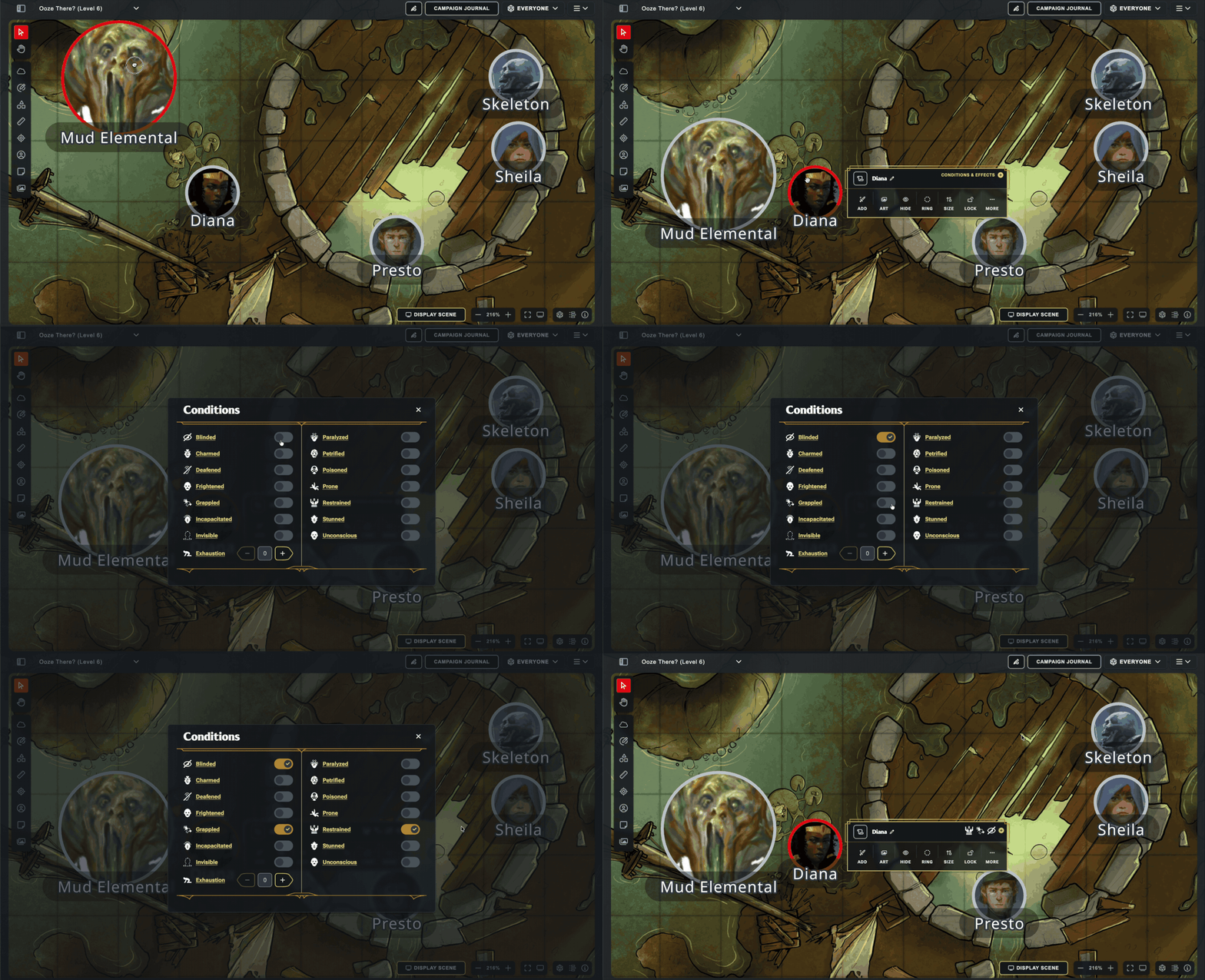
Back on June 8, when we updated our token menu on Maps, one of the goals was to pave the way for the eventual addition of Condition Tracking. Select any token on the Maps VTT, open the dedicated conditions modal, and the standard conditions are just a click away—drop Blinded, Grappled, or Prone on a creature with a couple clicks, then get right back to the action.
Condition icons show up directly on the token's context menu, too, so the whole table can remember what exactly is affecting who. Whether an enemy knocks your Fighter Prone or a well-timed Hold Person leaves the boss Paralyzed, everyone can strategize accordingly!
Tip: The Conditions Sync From Character Sheets to Maps
Condition Tracking also syncs with Character Sheet! When you add or remove a condition from the Conditions section on your Character Sheet, it will sync live with Maps. (Quick note: sometimes you'll have to refresh the character sheet to force it to re-sync with Maps. That's a limitation of our old platform, and will be addressed in the future)
Join the Conversation
Got feedback, or want to show off a truly cursed pile of conditions stacked on one unlucky token? Post it in Discord or on /r/dndbeyond—we’d love to see how your table puts condition tracking to work on the Maps VTT!
-
View User Profile
-
Send Message
Posted Jul 24, 2026This is a fantastic update and is very much appreciated. The team has been killing it with all the QoL updates. Keep up these great changes!
-
View User Profile
-
Send Message
Posted Jul 24, 2026Thank you for all the development updates and the work going into the Maps VTT. This is a great addition.
It would be helpful if the conditions also showed up on the expanded info in the combat tracker, even if just the icons, so as you are working through the combat round you can see quickly what is effecting the current npc as you plan its movement/attacks. Other than glancing to see where the current npc is on the map or moving the token, I typically am using the combat tracker information rather than expanding the token information.
Would also like to see SAP added in as an condition/effect.
Thank you again for all the work and updates.
-
View User Profile
-
Send Message
Posted Jul 24, 2026amazing! I wish It would show on the token as a symbol as well so you can tell without having to click everything!
-
View User Profile
-
Send Message
Posted Jul 24, 2026Very cool, but I would like a "Dead" condition as well... So many monsters left lying on the map...
-
View User Profile
-
Send Message
Posted Jul 24, 2026Would be nice to add this to the encounter builder for IRL play.
-
View User Profile
-
Send Message
Posted Jul 24, 2026Very helpful - but adding a visual indicator for the "Dead" condition would be great too.
-
View User Profile
-
Send Message
Posted Jul 24, 2026Any word on custom icons for Tokens?
-
View User Profile
-
Send Message
Posted Jul 24, 2026This is amazing! I love seeing maps slowly transform into a more robust (though still approachable) VTT. I would love to see a feature that eventually makes visible health bars for enemies. Necessary? Nah, but it's totally something I'd dig.
-
View User Profile
-
Send Message
Posted Jul 24, 2026A big help and I got to use them today in fact. Great timing!
-
View User Profile
-
Send Message
Posted Jul 25, 2026And still no condition tracking on the encounters tool after the community has asked for it for what feels like a solid decade now. Seriously?
-
View User Profile
-
Send Message
Posted Jul 25, 2026thanks for another awesome update
-
View User Profile
-
Send Message
Posted Jul 25, 2026Will they add Bardic Inspiration or a Custom option for spell effects like haste on allies or hunter's mark on enemies?
-
View User Profile
-
Send Message
Posted Jul 25, 2026There should be more obvious symbols, say, on the side of the token to easier tell what conditions are applied. Otherwise, we have to click each token to tell or depend on the colored borders.
-
View User Profile
-
Send Message
Posted Jul 25, 2026FINALLY! Thank you, developers!
-
View User Profile
-
Send Message
Posted Jul 25, 2026For stuff like a spell like "Hold Person" that lasts X rounds, could you have a countdown clock that reduces by 1 each round when you click "Next" on the combat thing?
-
View User Profile
-
Send Message
Posted Jul 25, 2026Love this but it does need to show on the token somehow without players having to click on the tokens. Something for concentration would be awesome as well.
-
View User Profile
-
Send Message
Posted Jul 25, 2026So, are we finally getting a proper, functional fog of war that updates as the character moves, instead of simply erasing it? It’s kind of crazy that we’re still missing a feature that games had figured out 20 years ago.
-
View User Profile
-
Send Message
Posted Jul 25, 2026Will it give all the names and bones automatically and give lock tokens from moving and require an override to move them if it is dragged or thrown?
I really want to see an option to lock inventories when the game is not in session and for the DM to get a history for the parties inventory and a way to add items to the maps that can be picked up and added to ones inventory
-
View User Profile
-
Send Message
Posted Jul 25, 2026Thank you so much for this! If you could add a custom condition feature (and make sure custom conditions could be added more than once) and also add a concentration one, then we’re set!
Thanks for continuing to bring updates!
-
View User Profile
-
Send Message
Posted Jul 25, 2026I love the idea and thank you for adding it!!!!