




Chaotic combat is a blast, until you have to start keeping track of it all in your head—who’s Prone, who’s Blinded, and who got knocked Unconscious from the Ancient Red Dragon's last Breath Weapon attack.
Starting today, D&D Beyond makes that easier than ever on the Maps VTT with an upgrade built to keep your whole table on the same page: Condition Tracking on every token.
Conditions at a Glance
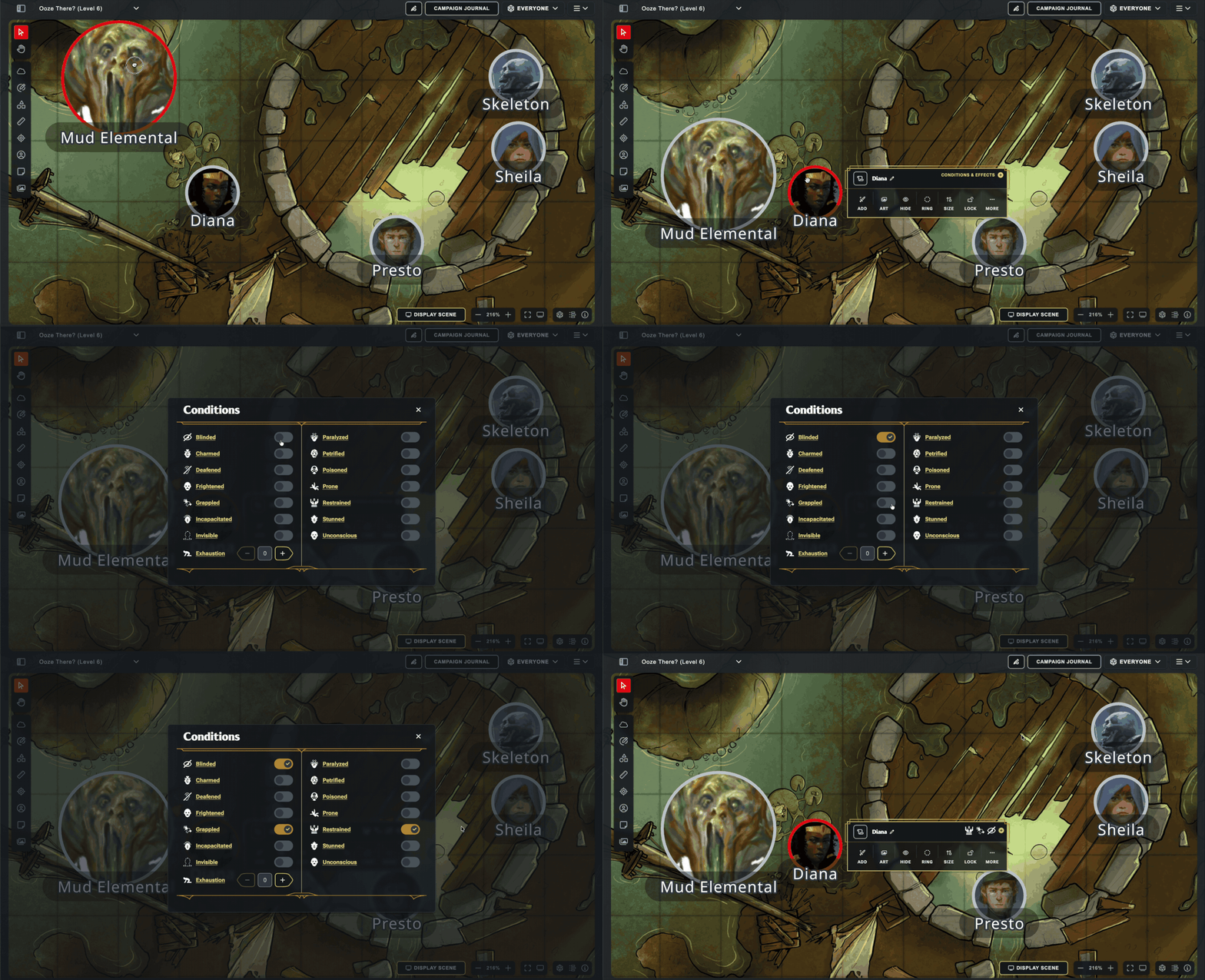
Back on June 8, when we updated our token menu on Maps, one of the goals was to pave the way for the eventual addition of Condition Tracking. Select any token on the Maps VTT, open the dedicated conditions modal, and the standard conditions are just a click away—drop Blinded, Grappled, or Prone on a creature with a couple clicks, then get right back to the action.
Condition icons show up directly on the token's context menu, too, so the whole table can remember what exactly is affecting who. Whether an enemy knocks your Fighter Prone or a well-timed Hold Person leaves the boss Paralyzed, everyone can strategize accordingly!
Tip: The Conditions Sync From Character Sheets to Maps
Condition Tracking also syncs with Character Sheet! When you add or remove a condition from the Conditions section on your Character Sheet, it will sync live with Maps. (Quick note: sometimes you'll have to refresh the character sheet to force it to re-sync with Maps. That's a limitation of our old platform, and will be addressed in the future)
Join the Conversation
Got feedback, or want to show off a truly cursed pile of conditions stacked on one unlucky token? Post it in Discord or on /r/dndbeyond—we’d love to see how your table puts condition tracking to work on the Maps VTT!
-
View User Profile
-
Send Message
Posted Jul 26, 2026I think that encounter builder is low priority at the moment.
-
View User Profile
-
Send Message
Posted Jul 26, 2026Many of the questions asked have alerady been answered in the Maps program. each time you sign in, it tells you what updates have been.
The one covering this update is as follows:
Latest Update: Condition Tracking
Condition Tracking available on all tokens
Conditions sync between Maps and Character Sheet! (Character Sheet may need to be manually refreshed)
Future enhancements include: condition icons on token name badges, track status effects like Falling, Concentration, Sap, 3/4 Cover, or add your own custom conditions like Rage, Hunter’s Mark, or even “Bad Hair Day”
Read more about our first version of Condition Tracking
-
View User Profile
-
Send Message
Posted Jul 26, 2026This is a great addition! Thanks a lot!
I would have liked to have "Bloodied" as one condition though and I would also like to have "Effected by spell..." fillable by me and perhaps even "... cast by" added so I for instance can say that this mob is Effected by Hunter's Mark from Gwendolin and it's Effected by Curse from Razhmordin.
Finally I would love some high visibility marking on the token that there are Conditions on this mob. You don't need one marking for each condition IMHO, it's enough with one mark notifying us all that "this token has conditions".
Thank you very much!
-
View User Profile
-
Send Message
Posted Jul 26, 2026We need concentration and custom conditions!
-
View User Profile
-
Send Message
Posted Jul 26, 2026Did you not read my post two items up? They are working on them.
Future enhancements include: condition icons on token name badges, track status effects like Falling, Concentration, Sap, 3/4 Cover, or add your own custom conditions like Rage, Hunter’s Mark, or even “Bad Hair Day”
-
View User Profile
-
Send Message
Posted Jul 27, 2026Great addition, could we have one added for Concentration, it would make life a lot esier.
-
View User Profile
-
Send Message
Posted Jul 27, 2026https://www.reddit.com/r/dndbeyond/comments/1u0hlat/comment/oqjsw4w/
-
View User Profile
-
Send Message
Posted Jul 27, 2026The encounter tracker is not low priority. It's deprecated.
Hopefully they'll release a standalone of the one in maps soon.
-
View User Profile
-
Send Message
Posted Jul 27, 2026Zac, I liked the flexibility of hiding/revealing the Bloodied condition from players...until one of them started playing a Scion of the Three Rogue. Now, every time something takes damage, I hear, "Is it Bloodied yet?" I've started adding red rings to every Bloodied creature now. If more officially published material is going to start utilizing Bloodied, I think it should be more visible to players.
Frankly, I don't really want to add tracking it to my DM responsibilities either. One feature I really liked from Encounters was how creature icons would turn red when Bloodied. That wasn't player-facing, but I think an elegant solution would be to add that to the initiative order portraits, triggered automatically by the hit point trackers (added benefit for the party healer if it worked on player characters too!). If DMs don't like it, maybe it could be switched on/off from the Settings menu.
-
View User Profile
-
Send Message
Posted Jul 28, 2026This is awesome and a much needed feature, thank you :)
-
View User Profile
-
Send Message
Posted Jul 28, 2026https://www.reddit.com/r/dndbeyond/comments/1u2hiy3/comment/oqymy6f/
-
View User Profile
-
Send Message
Posted Jul 28, 2026There is one Condition that I can't find on the table of conditions is Flying/Floating for character's speices and NPC's(hostile and non-hostile). I understand that condition may be hard to code for but hopefully it will made in the future.
-
View User Profile
-
Send Message
Posted Jul 28, 2026please add a chat!!
-
View User Profile
-
Send Message
Posted Jul 28, 2026Outstanding, very stoked to try this, it's a factor that has held me back from implementing more in my games. Definitely will dig into this further, thank you for continuing to grow MAPS and please keep it going, I would love for this to flesh out to being an exceptional top-tier option.
-
View User Profile
-
Send Message
Posted Jul 29, 2026I actually feel that Maps is the perfect blend of simple (elegance) & practicality vs deep(er) (complex) and overbearing system such as Foundry, Roll20 etc which I’ve used before but if you have to create macros to make your gameplay faster than I’m less interested.
LOVE that conditions are here, still waiting for them to have built in timers as well as adding spell effects to the same.
-
View User Profile
-
Send Message
Posted Jul 29, 2026THIS ^^^
-
View User Profile
-
Send Message
Posted Jul 29, 2026I love this! I would also really love to see a way we can mark down concentration and like, maybe targeted things like Hunter's Mark? :)
-
View User Profile
-
Send Message
Posted Jul 30, 2026Flying isn't a condition, but I'd guess what you're asking for is an altitude indication.
-
View User Profile
-
Send Message
Posted Jul 30, 2026It does. You just have to refresh the page for the character sheet. Same with HP.
-
View User Profile
-
Send Message
Posted Jul 30, 2026This is awesome and I was super excited to see this.
My wishlist keeps coming true.
Next up would be concentration indication and custom radius/colored auras bonded to a character. The overlays and bonding them to a character is nice, but the auras would be the next step to make it fully intuitive.