




Chaotic combat is a blast, until you have to start keeping track of it all in your head—who’s Prone, who’s Blinded, and who got knocked Unconscious from the Ancient Red Dragon's last Breath Weapon attack.
Starting today, D&D Beyond makes that easier than ever on the Maps VTT with an upgrade built to keep your whole table on the same page: Condition Tracking on every token.
Conditions at a Glance
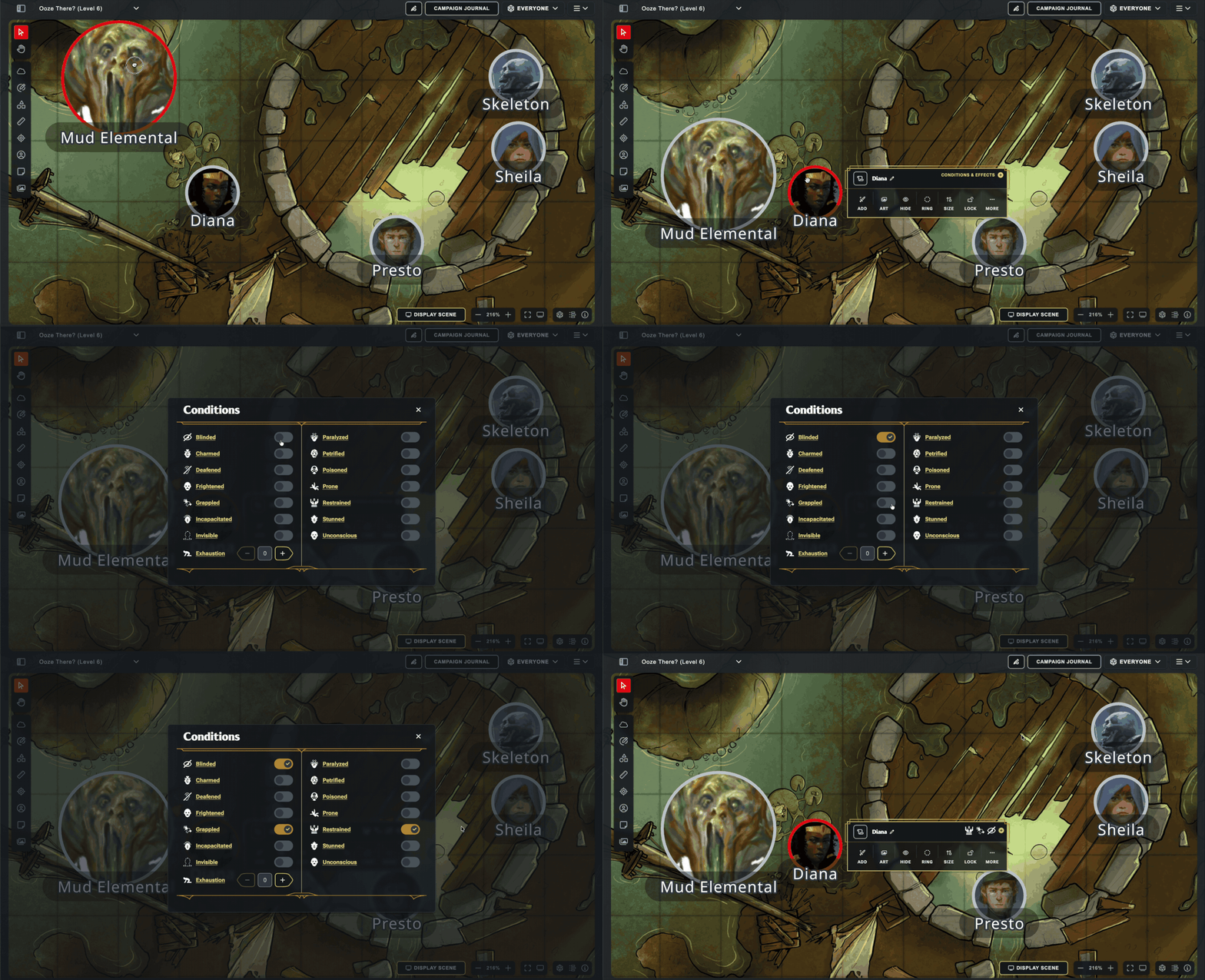
Back on June 8, when we updated our token menu on Maps, one of the goals was to pave the way for the eventual addition of Condition Tracking. Select any token on the Maps VTT, open the dedicated conditions modal, and the standard conditions are just a click away—drop Blinded, Grappled, or Prone on a creature with a couple clicks, then get right back to the action.
Condition icons show up directly on the token's context menu, too, so the whole table can remember what exactly is affecting who. Whether an enemy knocks your Fighter Prone or a well-timed Hold Person leaves the boss Paralyzed, everyone can strategize accordingly!
Tip: The Conditions Sync From Character Sheets to Maps
Condition Tracking also syncs with Character Sheet! When you add or remove a condition from the Conditions section on your Character Sheet, it will sync live with Maps. (Quick note: sometimes you'll have to refresh the character sheet to force it to re-sync with Maps. That's a limitation of our old platform, and will be addressed in the future)
Join the Conversation
Got feedback, or want to show off a truly cursed pile of conditions stacked on one unlucky token? Post it in Discord or on /r/dndbeyond—we’d love to see how your table puts condition tracking to work on the Maps VTT!
-
View User Profile
-
Send Message
Posted Jul 23, 2026Amazing! I've been asking for this for what feels like ages, and so glad it's finally been released! I feel like Maps is going from strength to strength. Thank you to the dev team, you're doing amazing work with it!
-
View User Profile
-
Send Message
Posted Jul 23, 2026Glad to have this finally implemented! Are we able to add custom conditions? monsters of drakkenheim adds a bunch of new conditions and the Contaminated mechanic as well.
-
View User Profile
-
Send Message
Posted Jul 23, 2026Glad to see the VTT continuing to receive frequent updates. Still not as fancy as some of the others, but really easy to use on the DM's side! Would be nice to get an audio feature so I can put background audio for the players to hear, but dunno if that is in the cards...
-
View User Profile
-
Send Message
Posted Jul 23, 2026This would be amazing! Either as a custom homebrew condition or integrated with whoever purchased the digital Monster of Drakkenheim DDB pack.
-
View User Profile
-
Send Message
Posted Jul 23, 2026I wonder if the conditions are also going to be reflected in the character sheets. What I mean is suppose you take a level of exhaustion, will the corresponding penalties actually show up on the character sheet? In other words will it deduct your movement speed by 5 feet and give a - 2 to everything?
-
View User Profile
-
Send Message
Posted Jul 23, 2026Very good stuff, keep it up!!!
-
View User Profile
-
Send Message
Posted Jul 23, 2026yes.. finally.
-
View User Profile
-
Send Message
Posted Jul 23, 2026Pretty sure character sheets are already modified by any conditions, including exhaustion, you add there.
-
View User Profile
-
Send Message
Posted Jul 23, 2026nice! i hope we can get the option to swap out token images at some point in the near future too--its a bit cumbersome to have to make a homebrew copy of a generic statblock so you don't have to be like "this guy is an archmage no he doesnt look like a red wizard thats just the generic archmage artwork"
-
View User Profile
-
Send Message
Posted Jul 23, 2026Just need conditions to actively affect the character sheets
-
View User Profile
-
Send Message
Posted Jul 23, 2026Great! I'd like to see a few more common states that are not technically be conditions--Bloodied, Dodging and Concentration come to mind--but that I still try to track on Maps. Custom conditions would be a good feature too.
-
View User Profile
-
Send Message
Posted Jul 24, 2026Thank you! Thank you! Thank you! Thank you! Thank you! Thank you! Thank you! Thank you!!!!!!!!!!!!!!!!!!!!!! I have been waiting so long for this feature and I am so glad that it is finaly coming to DDB!!!!
-
View User Profile
-
Send Message
Posted Jul 24, 2026Amazing
-
View User Profile
-
Send Message
Posted Jul 24, 2026Now to just have the tokens display some sort of marker -- I have the impression that is coming.
At least they are on the individual token when selecting them now.
-
View User Profile
-
Send Message
Posted Jul 24, 2026Does imposing conditions make the necessary adjustments to your character sheet? If I am blinded, will it be adjusted so my attacks are at disadvantage?
-
View User Profile
-
Send Message
Posted Jul 24, 2026Keep up the great work! Maps VTT is evolving wonderfully.
-
View User Profile
-
Send Message
Posted Jul 24, 2026Thanks! Could we also get tracking for homebrew conditions?
-
View User Profile
-
Send Message
Posted Jul 24, 2026Elevation tracker soon please.
(I know you can just edit the name to contain this info, but still).
-
View User Profile
-
Send Message
Posted Jul 24, 2026Finally !!
-
View User Profile
-
Send Message
Posted Jul 24, 2026HOLY WOW! AMAZING!!!! This is great. Can't wait to play with this. Loving the continued developments on Maps VTT. Only condition I would like to see is to indicate that the character is concentration on a spell!
Also agree with these!